Forum Replies Created
-
AuthorPosts
-
 SILVER Member
Given that one of the latest ‘Reloved’ products is a Beogram 2000 for £2000, I’d say B&O still have a fairly healthy VHNW strategy.
Is that the one Steve bought off eBay for £45?
Location: UK
Favourite Product: Beolab 3000
My B&O Icons:


just ask what you want to achieve, there is almost always somebody over here with the right advice
That’s why we come here 😁
What I’m after should be pretty straightforward. At its simplest we have three rooms – lounge, dining room, kitchen. The sources (Beosystem 6500 at the moment) are in the lounge, as is the non-B&O TV. We listen to vinyl records, CDs and FM radio (and TV in the lounge only) via the Beosystem, and I also have a Majority Fitzwilliam streamer into the Tape2 port for DAB, Spotify Connect, Bluetooth and Internet Radio.
In the dining room and kitchen (and possibly other rooms too) we would like to be able to listen to (and control) the main audio sources from the Beosystem without echo, and be able to press a single button to ‘Join’ and the same button to ‘Leave’ as we see fit. Volume control without finding a remote is a bonus too.
Masterlink seems like an ideal way to achieve this – IR eye with volume control, almost instant joining, no delay or echo, CAT7 RJ45 infrastructure. No messing about with networks or wireless dropping out, everything reliably hard-wired, and no having to use a phone to control anything. And pretty cheap now. Better than Master Control Link as the wiring is easier to install and more versatile, and the IR eyes have direct volume control. But I as discussed above I can’t get Masterlink to work without putting the whole system into standby when ‘Leaving’ the last link room. This is slightly annoying with e.g. FM radio or the streamer, as it’s quick to turn back on again, but really annoying with vinyl, as the record stops completely and has to be restarted again from the beginning.
I have no interest in distributing sound or pictures from a TV.
Should be straightforward!?!
Dave
Location: UK
Favourite Product: Beolab 3000
My B&O Icons:
Not sure if it has an effecgt, but have you tried to power up the NL/ML Converter before the other parts in the system?
I do not have acces to my NL/ML converter at the moment, so it will be some time before I can share how my settings for it are
I’ll have another crack at this at the weekend. Am more prepared to invest time into the Converter now after carolpa’s revelations.
Location: UK
Favourite Product: Beolab 3000
My B&O Icons:
the BLC (NL/ML converter s not “crippled”!
the first BLC sold had these ports covered with a plastic strip. It, the strips, can easily be removed.
then the PL, Line in and IR connections are available and working. See a picture of a later version to determine which port is which.Amazing! You’re quite right. Thanks @carolpa! I’ve peeled off the white plastic strips and there they are – two more RJ45 ports and two Kinch/phono sockets. That’s a world of future fun if I can ever get it configured properly!
Location: UK
Favourite Product: Beolab 3000
My B&O Icons:
Well my eBay ML/NL converter 1790 arrived on Friday, and a bit of time this weekend to do some testing.
Firstly caveat emptor, my ML/NL convertor – apparently Hardware Type F according to the web configuration – is a bit crippled as it does not have ports for Powerlink, for Line In, or for an IR sensor. When I looked again at the eBay photos that’s clear, but I had not thought such things existed so failed to look closely. I did look at the software version etc, which seems to be up to date – 1.43 or something. Not a problem for this particular problem, but it does mean I’m not going to be using it for any other exciting purposes.
After a lot of messing about with routers and IP addresses etc, I eventually got the thing connected to a web browser and was able to check it was set as V. Master. Then connected it to my Masterlink setup, turned everything on in hopefully the right order and… no change. Play button on a ML-connected link device still turns everything off. I have not done extensive testing with lots of different IR eyes and devices but have tried various sorts of turning things on and off again.
I’m still baffled and a bit disheartened at this stage. Mostly I think I’d be better off going back in time to the reliable MCL system and wiring the house and new extension for that, but it does seem a bit strange to hard-wire a new build with fairly obsolete tech. One of the attractions of ML is wiring with standard Cat 7 infrastructure which could be used for ML, PL, NL or even The Internet. Or I could go the other way to the modern world of NL and Mozart but that brings all its own issues of network configurations, audio delay, potentially vast expense and, god forbid, controlling things via a phone app. In so many ways Masterlink feels like the sweet spot but if I can’t turn a link room off without the whole system going into standby, it’s all a bit pointless.
Location: UK
Favourite Product: Beolab 3000
My B&O Icons:
If you are going to use an IR eye for it be aware that you will need the newer type with a join button to be able to use the buttons on the IR eye. If you however only need the IR functionality you can wire up the one of the older ML or MCL IR eyes but only connection to ground, +5V and data.
That’s really useful to know, thanks. By chance I have an IR eye for a Beosystem 3 which has more connections inside than the standard round eye. Do you know if that would work with the NL/ML Converter? It’s just sitting in my spares box otherwise.
Location: UK
Favourite Product: Beolab 3000
My B&O Icons:
Well I missed out on the Beosystem 3 but have successfully outbid everyone else in the entire world on a NL/ML Converter which will hopefully arrive for the weekend. The madness continues!
Location: UK
Favourite Product: Beolab 3000
My B&O Icons:
A little more testing today. Tried again with the NL/ML converter and some other cables, and this time it worked as expected so that is a possible solution for this issue.
That’s interesting @Madskp. With the NL/ML converter configured as videomaster?
I was bidding on ebay for a cheap Beosystem 3 to try that too, but outbid. Hey ho. Not sure what I can try next.
Location: UK
Favourite Product: Beolab 3000
My B&O Icons:
Well that is interesting, @Madskp, and I’m sorry I doubted you, @carolpa! It does seem a slightly peculiar state of affairs. Am I going to have to buy an old B&O tv and hide it in a cupboard somewhere to get a Masterlink audio setup to work properly?
Now I’m wondering whether it has to be a genuine video source or whether it’s possible to fool the system with an additional source into the 1611 as in Matador’s illustration?
Location: UK
Favourite Product: Beolab 3000
My B&O Icons:
At the moment I have no genuine junction boxes in ML cables, so there’s no shorting between pin 3 (wh/bl, ‘ML sensor’) and pin 12 (pink, ‘+supply voltage’), as recommended on pages 34 & 35 of this Masterlink handbook. I should be able to do this fairly easily at my distributor but not for a couple of days. Do you have the short circuit in your setups, @madskp? No idea if this is actually relevant or not.
Wrong again, disappointingly. I set out to connect the white/blue and pink on my distribution board but found they were already connected, which of course they have to be in a ML-plug to RJ45-plug cable. So that’s not the answer to the conundrum. FWIW I tried disconnecting the pink cable entirely, but then nothing worked.
Location: UK
Favourite Product: Beolab 3000
My B&O Icons:
@TK – thanks for all that helpful and interesting information. If I can attempt to boil that down to my own level of understanding. everything is ‘Language A/MCL’ from the invention of the Beolink 1000 and MCL2, up to the invention of Masterlink, which is then a new ‘Language B/ML’, and the IR-eyes are not doing any translating, just passing ‘Language A/MCL’ messages. Newer ML equipment is presumably translating the Language A signals to Language B and in the case of the BL1611, back again:
Beolink 1000 > Language A/MCL > Beolink Passive > Language B/ML > Beolink Converter > Language A/MCL > Beomaster 6500
Possibly I’m wrong and there is no independent Language B, it’s just Language A with a bigger potential set of commands.
Anyway what I still think may be happening is that the short Standby command is being mis-translated or miscommunicated into Language B/ML. I presume this is happening in the Beolink Passive (or Active) but whatever circuitry is doing that mistranslation is bypassed if the Passive is used as an ML/MCL converter. This is definitely making my brain hurt a bit!
Location: UK
Favourite Product: Beolab 3000
My B&O Icons:
The T1611 was designed to connect a non ML Audio to a ML Video – or – to connect a ML Audio to a non ML Video.
In the proposed settting the Video ML/ Video non ML is missing. Maybe this is the cause of the behaviour.
Note: I have a Beosystem 7000 – T1611 – BLC connected in my Netlink. I have to set the BLC up as VMaster to work correctly if I’m right (note: I have to check this though! Currently the Beosystem 7000/BLC is out of order, starting early next week it is up and running again).Is that right? The 1997 Masterlink manual has this:
BeoLink Converter is used when audio and video products with Master
Link and Audio Aux Link (datalink) have to be interconnected.
BeoLink Converter can be used in conjunction with both a video and an
audio master. BeoLink Converter features autoconfiguration, meaning
that it is able to detect automatically whether it is installed in a Master
Link audio or in a Master Link video system. Configuration takes place
when it is connected to the mains.
BeoLink Converter can also be used as ML-driver*, which means that it is
possible to connect e.g. a BeoCenter 2300 via the BeoLink Converter to
the Master Link and thereby distribute sound to all link room products
(see page 17).
BeoLink Converter is used in compatibility setups (see the section on
recommended compatibility setups, page 17).
1161166
Which I would interpret as ‘can be used in an audio-only setup’. Frankly I can’t understand why anyone would want to connect their telly to a multiroom setup, but that’s me being out of step I guess!
Location: UK
Favourite Product: Beolab 3000
My B&O Icons:
Thanks for your interest too, TK. I thought of a thing that might be relevant to our query @madskp, and while looking it up saw a thing that might be relevant to @TK too.
At the moment I have no genuine junction boxes in ML cables, so there’s no shorting between pin 3 (wh/bl, ‘ML sensor’) and pin 12 (pink, ‘+supply voltage’), as recommended on pages 34 & 35 of this Masterlink handbook. I should be able to do this fairly easily at my distributor but not for a couple of days. Do you have the short circuit in your setups, @madskp? No idea if this is actually relevant or not.
Secondly, on that page 35 it mentions ‘Data speed is 19200 bits/second. By comparison, Master Control Link data speed is 160 bits/sec’. I’m well out of my depth here, but does that imply that ML and MCL data signals are a different ‘language’, if you’ll excuse the term? And does that imply that the IR signal from a Beo4 / Beolink 1000 is a different ‘language’ too? Here’s my schematic thinking:
Beo4 / Beolink 1000 – Language A
MCL – Language B
ML – Language C
Beomaster 5500 onwards – Language A
So sending a standby signal to the link room in my most recent experimental setup might do this:
Beo4 > Language A > Rectangular IR Eye translates to Language B > MCL2A > Language B > into Beolink Passive acting as ML/MCL converter, which translates to Language C > Beolink Converter 1611 which translates back into Language A > Beomaster 6500
Without the MCL2A this might go:
Beo4 > Language A > Circular IR Eye translates to Language C > Beolink Passive > Language C > Beolink Converter 1611 which translates back into Language A > Beomaster 6500
In my scenarios here it is the translation of the standby signal from A to C in the Round IR Eye that is going wrong and causing the incorrect standby command to reach the Beomaster.
Of course (a) this might all be rubbish, and (b) it doesn’t explain the ‘correct’ behaviour at times when two ML link products are connected.
Location: UK
Favourite Product: Beolab 3000
My B&O Icons:
More conflicting madness from today’s brief experiment.
I added an MCL2A to the far side of the Passive:
BM6500 > AAL > 1611 >ML > BL Passive no IR eye> MCL > MCL2A+rectangular IR eye > Beovox 3000s
Success! System works as it should. Short press on the rectangular IR eye puts only the Passive into standby, Long press puts the whole system into standby. With Main and Link rooms on, muting the BM6500 mutes only the main room, not the link room. Volume control independent in both rooms. Huzzah! Interestingly the rectangular IR-eye wakes the Passive and turns the sound on instantly, without the delay of a couple of seconds for the round IR-eye into the Passive.
Everything continues to work fine with the BL3500 back in MCL mode and connected direct to the BM6500, independent control of both link rooms and the main room without conflict.
I tried also plugging the round IR eye into the Passive too at the same time as the MCL2A. In this case the rectangular IR still works but the round IR does not. I guess using the MCL plugs tells the Passive it’s meant to be a ML/MCL converter and disables its IR port.
Still baffled though!
Location: UK
Favourite Product: Beolab 3000
My B&O Icons:
So I just did some testing with some of my equipment:
Beocenter 9300 – 7 pin datalink cable – 1611 – masterlink cable – Beolab 3500 MK1 both with, and without a powerlink cable between the BC9300 and the 1611.
Beosound Ouverture – Masterlink cable – Beolab 3500 MK1
In bot cases I get the same behaviour as you describe even when I start the music from the master system.
Now what I expected. I will see if I have time to look more into this today
Thanks for trying, and very interesting!
I did wonder if this is how the ML system is meant to work, and rather than pressing Standby in the link room you’re just meant to use the Mute button on a Beo4 or 1000. But I’ve found when trying this that the muted link product then turns itself off after half an hour or so, which in turn puts the whole system into standby. Not great if you’ve moved back from the link room to the main room to watch TV or whatever, and halfway through a show the sound cuts out.
Quite baffling. And not how an MCL system works.
Location: UK
Favourite Product: Beolab 3000
My B&O Icons:
Just some extra notes to be clear:
Do you start the music from the main system or from one of the link rooms, and do you also have the speakers in the main room in use in these scenarios?
I’ve tried all ways, with the same results as above. Starting the music in the main room and joining the link rooms, or starting and listening from a link room only, or starting from a link room and adding the main room in after. All result in the same behaviour. Agreed that this would be correct behaviour if listening in a link room only.
Location: UK
Favourite Product: Beolab 3000
My B&O Icons:
Results of today’s experiments!
Firstly I was wrong before about the Beolab 2000 working differently to the Beolink Passive. It doesn’t, the results are exactly the same.
I’ve got a long sheet of permutations and results, but they all correlate so far into two scenarios. Setup is:
BM6500 Aux socket > 7-pin ‘Audio Aux Link’ cable > Beolink 1611 converter > Masterlink to RJ45 distribution board* > BL Active/BL Passive/BL2000/BL3500
Results are:
Any one of BL Active/BL Passive/BL2000/BL3500 connected: Pressing the standby button directly or via Beo 4 / Beolink 1000 on the link product turns the whole system into standby
Any two of BL Active/BL Passive/BL2000/BL3500 connected: If both link products are On, turning either of them Off (into standby) works as it should, with the Beomaster and the other link remaining On. But if the second link product is then turned Off (standby), the whole system turns off. This is the same whichever link products are connected, and whichever order they’re switched on or off in. Putting the first link product into standby works as it should, putting the last link product into standby turns everything off.
I don’t (at the moment) have enough bits of Masterlink cable with the right ends to try more than two link products at once, but I suspect the same result: last one into standby turns everything off. As reported above the same behaviour appears with one product and genuine Masterlink cables so I don’t think it’s my home-made RJ45s at fault.
So I still don’t know if it’s my 1611 or my Beomaster that’s at fault, or something else. I have a bid on another 1611 on eBay as that’s the cheaper experimental option! Would like to try with a different AAL- or Masterlink-enabled Beomaster but I don’t have such a thing. At the moment.
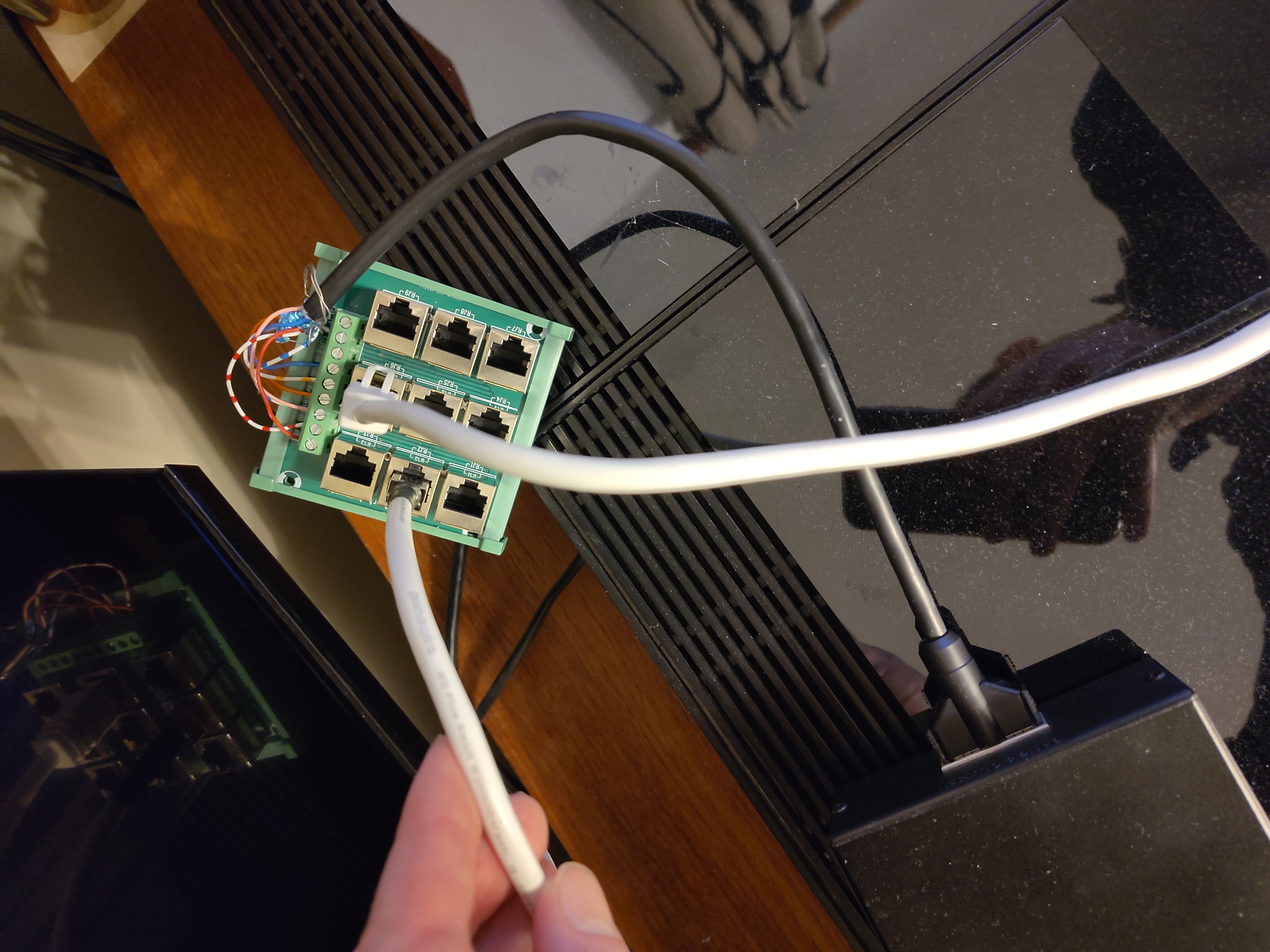
- quite pleased with the RJ45 distributor, a few £ from eBay and easy to attach a Masterlink cable to. All shielded/ grounded too.

Location: UK
Favourite Product: Beolab 3000
My B&O Icons:
I have been working my way through that thread, there’s lots of good info in there. I’d not really appreciated you could get an output from e.g. the Tape socket on a Beomaster, though I realise now that’s exactly what the Audio Aux Link into a 1611 is all about. There’s a world of non-wife-friendly possibilities with this stuff!
Location: UK
Favourite Product: Beolab 3000
My B&O Icons:
Well I’d already extracted the BM3300 from the shed by the time I read your sensible comments about Datalink 86 @Madskp, so thought I’d try it anyway. Of course it doesn’t have an Aux port, just CD, Tape and Phono. I connected a 7-pin from the 1611 to the Tape socket and fired up the radio, then turned on the Passive, and there was sound! I could control the volume on the Passive with the IR eye or Beolink 1000, but could not control the BM3300 through the IR eye which confirms your Datalink thoughts.
Interesting, but I’m not sure whether there’s much practical application for this. You could establish a link room with ‘join’ and volume control only I guess. Perhaps running a pair of active powerlink speakers from the BM3300 rather than Beovoxes, but still a bit of a faff.
Experiments currently underway with the Active/Passive/BL2000. Results so far are consistent, but confusing! Will report back later.
Dave
Location: UK
Favourite Product: Beolab 3000
My B&O Icons:
Hi Madskp,
Thanks for the input. Yes odd indeed. I have now tried (I think) all permutations of turning things on in different orders, and with and without the existing MCL (BL3500) connections to the BM6500 in place, and still no change.
I do have another IR eye and have tried that too, no change. Oddly the standby light on one of the IR eyes does not light up, but it doesn’t seem to make any difference.
Learning from The Princess Bride, I thought it might be helpful to list my relevant assets:
Beosystem 6500
Beomaster 3300, currently in the shed
Beolab 3500, currently wired in via MCL to the BM6500
Beolab 2000, currently doing nothing
Beolink Active 1636 + IR eye, currently doing nothing
Beolink Passive (no idea which version) + IR eye, currently connected via ML+Beolink Converter to the BM6500
MCL2AV, currently not connected
MCL2A, currently not connected
Beolink Converter 1611
Various original and home-made ML cables including an RJ45 distribution panel
Beolab 4000 Mk1s, currently Powerlinked to the BM6500
Beolab 3000s, currently acting as Beovox 3000s and connected to the Passive.
Various passive speakers (inc C75, BV3800)
I’ve tried the current setup both with my home-made cables and some ‘genuine’ ML cables with and without junction boxes, and same behaviour. I’ve also tried with and without a fully-wired powerlink cable between the BM6500 and 1611, which doesn’t seem to make any difference at all. Currently running it without. 1611 is connected to the Aux port on the BM6500, it doesn’t seem to work at all in Tape which would have been my preference.
Things I intend to try this weekend:
- try the Active at the same time as the Passive, possibly with the BL2000 too, all connected through my RJ45 distributor. If I have sufficient bits of cable.
- get the BM33oo out of the shed and try that connected to the 1611. Not sure if this will work but if it does with the same behaviour it would suggest it’s my 1611 that’s the problem
- maybe try with the BL3500 via ML, though this might be more destruction than I have time and space for.
- I might also try the MCL2A or 2AV with their own rectangular IR eye connected on the far side of the Passive, and see how that works. But that might be a step too far.
Any other great ideas? Writing this all down has been quite helpful in itself.
Location: UK
Favourite Product: Beolab 3000
My B&O Icons:
-
AuthorPosts