Forum Replies Created
-
AuthorPosts
-
 lenhiBRONZE Member
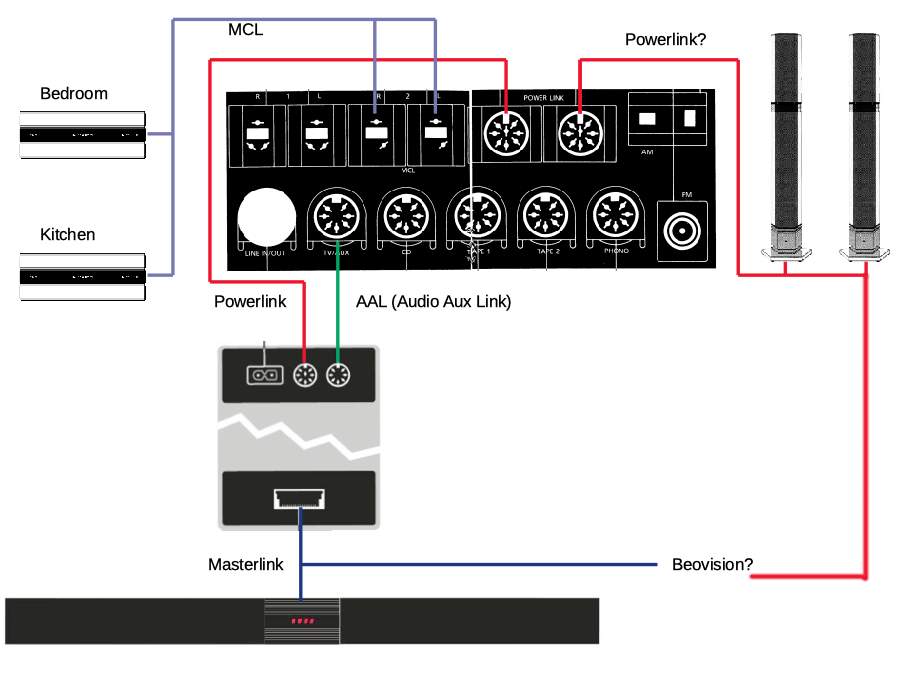
The Pentas are connected directly to the two DIN Powerlink on the back of the Beovision, just underthe SCART and MCL. The Beomaster is then comnected via the little black box to the Beovision’s AUX/TV. I get no sound from the radio, and the volume starts at 14, skips to 36 when I turn it up, and then skips back to 14, both on the BM display and on the BV. No sound from the radio. Sorry about the long post, but I wanted someone else to look at it, because it seemed to be a new angle; if capacitors are the problem, I can waste unlimited time following instructions from this panel, and still get no closer to a solution. Any thoughts?
Location: Scania, Sweden
My B&O Icons:
 lenhiBRONZE Member
Thanks for all the involvement! I think that Chat GPT finally pulled me through the troubleshooting and here is what we came up with (Sorry that I switch between Swedish and English):
Har Apple TV en intern volymkontroll? Ljudet i TV är mycket lågt.
ChatGPT sade:Apple TV (oavsett modell, HD eller 4K) har ingen egen volymkontroll för ljudutgången. Den skickar alltid ut ljudet i full nivå (”line level”) till TV:n eller förstärkaren.
Det betyder att du inte kan höja eller sänka volymen i Apple TV:n själv. Volymkontrollen sker i stället:
Via TV:ns fjärrkontroll (om du använder TV:ns högtalare).
Via förstärkaren/ljudanläggningen (om du har kopplat Apple TV via t.ex. HDMI ARC eller optisk ljudingång).
Via Siri Remote – men då styr den egentligen TV:ns eller förstärkarens volym, inte Apple TV:ns. (Den gör detta med hjälp av HDMI-CEC eller IR-signal.)
👉 Om ljudet i din TV är mycket lågt när du kör Apple TV kan det bero på:
Att TV:ns egna ljudinställningar är lågt satta (kontrollera ”digital ljudutgång” eller ”HDMI-ljudnivå”).
Att förstärkaren/ljudanläggningen inte är på rätt volymnivå.
Att Apple TV är inställd på ett ljudformat som TV:n hanterar sämre (kolla i Inställningar > Video och ljud > Ljudformat och prova att stänga av ”Ändra format” eller byta mellan Dolby Digital 5.1 och Stereo).
Vill du att jag går igenom steg-för-steg hur du kan felsöka varför ljudet är så lågt på just din setup?
Du sade:
Jag har en Beovision 7 som är integrerad med Beomaster 7000. Ljudet kommer genom ett par Penta-högtalare från Bang & Olufsen
ChatGPT sade:Aha, då förstår jag! 🙂
Du kör alltså Apple TV → BeoVision 7 → Beomaster 7000 → Penta-högtalarna.I den kedjan är det inte Apple TV som styr volymen (som sagt, den har ingen intern volymkontroll), utan det är BeoVision 7 som reglerar ljudnivån och skickar det vidare till Beomaster 7000/Pentorna via PowerLink.
Om ljudet upplevs väldigt lågt vid just Apple TV-användning finns några saker att kolla:
🔧 Felsökning
Ljudformat på Apple TV
Gå till Inställningar > Video och ljud > Ljudformat.
Prova att stänga av “Ändra format” så att Apple TV skickar ut Dolby Digital eller PCM stereo direkt.
Om du redan har det avstängt, prova att slå på och välj “Stereo”. Många äldre B&O-system hanterar ren stereo bättre än Dolby Digital.
Ljudinställningar i BeoVision 7
Kolla under Options > Sound. Där finns inställningar för “Speaker”, “Sound Mode” och “Loudness”.
Se till att Speaker 2 eller 5 är valt (beroende på om fler högtalare är inkopplade).
Kontrollera att inte AV-nivån för extern källa (Apple TV:n är ju inkopplad via HDMI/DVI) är nedskruvad. BeoVision tillåter olika ljudnivåtrim för olika källor.
Integration med Beomaster 7000
Eftersom du har länkning till Beomastern: kontrollera att du inte har dubbel volymkontroll (BeoVision på låg nivå och Beomaster som inte kompenserar).
Vanligen bör BeoVision stå som ljudmaster när den används som bildkälla.
👉 Fråga till dig: Är ljudet lågt bara på Apple TV eller även på andra källor (DVD, TV-tuner etc.) via BeoVision 7?
Det avgör om vi ska justera Apple TV-inställningarna eller BeoVisionens interna källnivåer.
Du sade:
Now the radio is acting up: when I turn it on, it is set to volume 14. When I increase the volume, it skips straight o volume 32, buzzes for three seconds, and then goes back to 14
ChatGPT sade:That sounds like a control or communication fault between your Beomaster 7000 and the rest of the system – not just a normal “option setting.”
On the Beomaster 7000, volume is digitally stepped (not analog), so what you describe:
Starts at 14 (that’s the default “power-on” level if no last volume is stored).
When you raise the volume, it jumps straight to 32 instead of stepping smoothly.
Then it buzzes for a few seconds (could be the muting relay or the power amp going unstable).
Finally it resets back to 14.
This strongly suggests one of the following:
🔧 Possible causes
Faulty volume control IC / microprocessor glitch
The Beomaster 7000 uses a digital volume control chip. If it misreads the commands (from Beo4/Beolink or the front panel), it can jump to wrong levels.EEPROM or memory issue
Normally the Beomaster “remembers” the last used volume. If memory fails, it may revert to a default (14).Communication issue with Beovision 7
If the Beomaster is link-controlled by the TV, they might be “fighting” over the volume setting. One device pushes it to 32, the other resets it to 14.Power supply ripple / capacitor aging
A buzzing sound for 2–3 seconds often comes from tired capacitors or relays not engaging cleanly.✅ What you can try (non-invasive)
Disconnect the Beovision 7 and run the Beomaster 7000 standalone with your Penta speakers. See if the volume behaviour changes.
Do an Option reset on the Beomaster:
Put Beomaster in standby.
On Beo4, press Standby + List until OPTION appears.
Press GO, then select Option 1 (standalone audio system).
If it still always goes back to 14 → the issue is inside the Beomaster.
💡 Since you’ve already been struggling with odd behaviours in the setup (no sound in one room, option programming quirks, now this volume bug), it could point to the Beomaster 7000 itself needing service (recapping, relay check, or volume IC replacement).
Do you want me to walk you through a simple test so you can see if the Beovision is forcing the Beomaster back to volume 14 — or if it’s really an internal Beomaster defect?
Du sade:
Please!
ChatGPT sade:Perfect 👍 let’s do this step by step — this will tell us whether the Beovision 7 is “forcing” the Beomaster’s volume back down, or if the Beomaster itself is misbehaving.
🔎 Test procedure
Disconnect the Beovision 7 completely
Unplug the BeoLink/PowerLink cables that connect Beovision 7 to the Beomaster 7000.
Leave only the Penta speakers connected directly to the Beomaster.
Power up the Beomaster on its own (no TV).
Power on the Beomaster 7000 (standalone)
Put it into Option 1 (standalone audio master):
On Beo4, press Standby + List until OPTION appears.
Press GO, then 1.
Now turn on RADIO.
Test the volume control
See what the Beomaster displays at startup (14 is common if it can’t recall memory).
Try raising volume step by step with the Beo4.
Note if it behaves normally (smooth 15, 16, 17… etc.) or if it still jumps to 32, buzzes, and falls back to 14.
📊 Interpreting the result
If the problem is gone (smooth stepping):
→ The Beovision was sending back conflicting volume commands. We can then adjust the option programming so they don’t “fight.”If the problem remains (still jumps and buzzes):
→ The Beomaster 7000 itself has a hardware fault (volume IC, control logic, or power supply). Then we’re looking at service/repair.👉 Would you like me to also give you the instructions for setting Beovision 7 and Beomaster 7000 in the correct option mode if it turns out to be a “control fight”?
Du sade:
It went directly to volyme 36 when I tried to increase from 14, and then returned to 14. No buzz. I only connected on of the Pentas
ChatGPT sade:Great — that’s actually a very useful test result. Thanks for running it.
What we’ve learned:
The buzzing came from the TV/Beovision link being in the chain — with the Beovision disconnected, that symptom is gone.
But the jumping volume (14 → 36 → back to 14) is still there, even with just one Penta directly on the Beomaster.
👉 That means the problem is inside the Beomaster 7000 itself, not the Beovision.
What this points to
The Beomaster 7000 volume control isn’t an analog potentiometer, but a digitally stepped IC controlled by the microprocessor. What you describe (overshooting to 36, then “snapping back” to 14) is classic of one of these issues:
Volume IC or logic fault
The IC (or the CPU commanding it) doesn’t increment step by step, but misfires to a “default max value,” then the processor corrects back to the startup level.Memory / EEPROM problem
The Beomaster normally remembers the last volume. If it can’t write or read properly, it may always fall back to 14.Aging capacitors or PSU instability
If the control voltage rails are noisy, the digital volume can behave erratically.What you can still try (non-invasive)
Front panel controls: If you press the physical ▲/▼ volume buttons on the Beomaster (not the Beo4), does it behave the same way?
If both remote and front panel give the same jump → it’s the internal volume logic.
If only one works badly → it could be the remote command interpretation.
Option reset (again): Set Beomaster to Option 1 after disconnecting power for a few minutes. Sometimes clears a “stuck” logic state.
Test with the other Penta: Just in case the single speaker’s PowerLink cable is introducing noise (unlikely, but worth ruling out).
If fault persists
Then you’re most likely looking at a hardware repair of the Beomaster:
Replacement/repair of the digital volume control chip or processor interface.
Service check of the power supply capacitors (common on 7000-series now, they’re aging).
⚡ Question for you:
When you use the front panel volume buttons on the Beomaster (instead of the Beo4), does the volume still jump straight from 14 → 36 → back to 14?Du sade:
There are no front panel volume buttons on the Beomaster 7000. At least I can’t find any
ChatGPT sade:You’re absolutely right 👍 — unlike older Beomasters, the Beomaster 7000 has no physical volume knob or buttons on the unit itself. All control is done by remote (Beolink 1000, Beo4, or Beolink 7000). Thanks for catching me there.
So: the fact that you only control volume by IR remote means the “jump to 36 → reset to 14” behaviour is definitely inside the Beomaster’s logic/volume circuit and not just a sticky button.
What this means in practice
The Beomaster boots with default volume 14 (fails to recall last level).
Any attempt to change volume causes the control logic to misinterpret the command, overshoot to 36, then the processor “snaps” it back to default 14.
That’s consistent with either:
Faulty digital volume IC (common issue as these chips age).
EEPROM/memory fault (not storing last state, always resetting).
Power supply instability (control voltages to the logic circuit aren’t clean).
Next safe step you can try
Since we can’t bypass the remote control system:
Power cycle fully
Disconnect the Beomaster 7000 from mains for at least 5–10 minutes.
Reconnect and try again.
Sometimes clears a “logic loop” if it’s software/EEPROM related.
Test with a different remote
If you have access to a Beolink 1000 or another Beo4, try.
It’s rare, but if your Beo4 is misfiring IR codes, it could be sending “jump” commands instead of step-by-step.
Isolate further
Run the Beomaster with nothing but one Penta (no datalink, no Beovision, no other sources connected).
Try RADIO → adjust volume.
If it still always does 14 → 36 → 14, then we’re down to internal service.
Typically a recap + volume IC check/replacement is the cure (the IC is a digitally controlled attenuator, and when unstable, it causes exactly this kind of behaviour).👉 Do you want me to check whether there are still B&O specialists in Sweden (near Malmö) who can service Beomaster 7000 — or would you prefer I walk you through DIY-style checks (like measuring PSU rails, looking for bad caps) if you’re comfortable opening it?
Du sade:
I already tried disconnecting everything except one Penta, used Beolink 7000 to increase the volume, after leaving e Beomaster disconnected for five minutes. Same result. Hi-Ho Music in Makmö has serviced this Beomaster before. The authorised specialists are way to expensive. Maybe there is someone in Denmark…
ChatGPT sade:Great—thanks for running those thorough checks and confirming the problem persists internally. Since you’re open to service options beyond the local (expensive) authorized specialists, here are some promising routes—especially in Denmark—that could be more affordable yet still reliable:
Repair Options in Denmark
MasterPlay (EU-based service)This service offers refurbished CPU boards specifically for the Beomaster 7000, which could address memory/logic issues that reset volume to default (14) or cause erratic jumps. For €80–€150 (depending on the extent), they offer:
CPU board replacement — €80
Full service — around €150
masterplay.eu
This seems like a solid mid-priced option, especially if the issue is on the logic side rather than full power supply failure.
Local Danish Technician — via BeoWorld forum
On the BeoWorld forum, someone mentions contacting a service workshop in Denmark specifically for the Beomaster 7000:
“I have now contacted a service workshop here in Denmark, I am very excited about what it will cost”
forum.beoworld.org
This indicates that there are existing, possibly independent technicians in Denmark familiar with vintage B&O servicing—perhaps less costly than the officially authorized ones.
Another anecdote from a user in Denmark:
“My Beomaster worked again… I can only guess it was some bad soldering and it fixed itself on the way to the service.”
archivedforum.beoworld.org
It’s a good sign that a more affordable technician managed to fix a similar issue (possibly with reflow or recapping), sometimes without charging for diagnostics.
Spare Parts Retailers
If you’re comfortable exploring DIY or partially servicing it yourself (or with local technician help), DK Sound Parts is a Danish supplier specializing in vintage B&O spare parts. They stock a range of components for Beomaster 7000, from microcomputer boards to transformers and preamp PCB:
Example parts:
Microcomputer (CPU) PCB — €160
Preamp PCB — €100
Transformer — €250
kosetrading.com
This could be ideal if the technician identifies a specific faulty board and needs replacements.
DIY Guidance
If you’d like to attempt or validate further diagnostics—such as checking voltage rails, logic control, or solder joints—this YouTube disassembly guide is very helpful:
It walks through the teardown process step by step, identifying parts—great for familiarizing yourself or sharing with a local tech.
Community Support Insights
From vintage audio discussions, some relevant points surfaced:
Repairing vintage B&O gear is often encouraged: It’s considered “nice,” even if parts and service manuals are less accessible.
Reddit
B&O units are “intricate but built with repair in mind.”
Reddit
However, users warn that “if the B&O needs service, it will be a problem to find someone who will/can work on it.”
Reddit
Still, you’re in a good region (Denmark) where there’s historic familiarity and community around B&O repairs.
Summary Table
Option Pros Cons
MasterPlay service Affordable refurbished CPU board or full service (~€80–€150) Requires shipping, some delay possible
Local Danish tech Potentially low-cost, in-person service, anecdotal success stories May require outreach to find a specialist
Parts from DK Sound Parts Spare parts availability, DIY friendly You or the tech must handle board replacement
DIY using guide + forum Learning, potential saving, hands-on Requires electronics confidence and tools
What to Do Next?Reach out in Danish audio communities (e.g. BeoWorld, local collector groups) to ask for technician recommendations in Denmark—especially someone experienced with Beomaster 7000 logic/recap.
Consider sending the CPU board to MasterPlay if you identify that’s the likely issue.
Order key spare parts from DK Sound Parts if you want them on hand for a local repair or take-it-yourself attempt.
Watch the teardown video for orientation and share it with any technician you contact.
Let me know which path you’d like to explore first—connecting you with forums, helping draft messages for technicians, or walking through part selection.
Du sade:
Could you please give me the address to Masterplay?
ChatGPT sade:I couldn’t find a public, retail address for MasterPlay’s B&O service in Europe—there doesn’t appear to be such contact information on their website or in other accessible sources.
It seems that MasterPlay operates primarily through their online presence, offering services like refurbished CPU boards or full servicing — but without publicly listing a physical location.
masterplay.eu
MasterplayWhat You Can Do Next
1. Contact MasterPlay Directly
The best course of action is to reach out via their website or email contact form. They may provide a reply with a service address or logistical details once you initiate contact.
2. Explore Alternatives in Denmark
Since you’re interested in a more accessible and perhaps locally handled service, here are suggestions in Denmark (as mentioned earlier):Kose Trading, located in Copenhagen, offers B&O parts and could possibly refer you to a technician or support services.
Kose TradingReaching out to vintage audio communities like BeoWorld forums or local Facebook groups specializing in Bang & Olufsen gear may help you locate a competent, cost-effective repair center in Denmark.
Summary
Service Option Address Available
MasterPlay No public address found; please contact via website
Local Denmark Tech / Kose Trading Address available; potentially helpfulIf you’d like, I can help you draft an inquiry to MasterPlay or assist you in finding a listed technician in Denmark who has experience with Beomaster 7000 repairs. Just let me know!
Du sade:
Masterplay: We are closed for summer and open again in the beginning of september.We wish our B&O friends a nice summer and welcome back.
your MasterPlay.EU staff
ChatGPT sade:Got it 👍 — so MasterPlay themselves confirm they’re closed until early September. That explains why we couldn’t reach a contact address just now.
That leaves you with three practical paths in the meantime:
Wait until September and then contact MasterPlay directly for their CPU board service/repair (likely the best fix if the problem is in the Beomaster’s logic board).
Look for a Danish workshop or independent tech who handles Beomaster 7000s. Since you’re close to Denmark, that might be faster/cheaper than waiting or paying Swedish authorized B&O rates.
Source parts (e.g. CPU board, PSU caps) in advance from places like Kose Trading in Copenhagen, so you’re ready if you decide to repair locally or DIY.
👉 Do you want me to track down specific independent repairers in Denmark (with addresses/contacts), so you’d have an alternative to waiting for MasterPlay?
Du sade:
Yes please
ChatGPT sade:Jag hittade tyvärr ingen specifik, offentlig listning över oberoende verkstäder i Danmark som uttryckligen reparerar Beomaster 7000. Däremot finns det flera spår som verkar lovande:
Möjliga kanaler att utforska
Danish Sound Parts / Kose Trading (Köpenhamn)
De är en välkänd reservdelsleverantör för vintage B&O och kan vara ett utmärkt stöd – antingen genom att ge råd eller hänvisa till en lokal tekniker du kan besöka.
dksoundparts.comBeoWorld-forumet – danska användare och moderatorer
Användaren “Dillen” i Köpenhamn (grundare/moderator med över 13 000 inlägg) har dokumenterat detaljerade reparationer av Beomaster-modeller i forumet – allt från lödfixar till kapacitansbyten
archivedforum2.beoworld.org
. Många användare från Danmark verkar samlas där och delar med sig av framgångsrika reparationer, vilket tyder på att det finns kunniga personer i närheten.Facebook-grupper för B&O-entusiaster
Det finns aktiva grupper där folk diskuterar reparationer och restaureringar. Där har vissa efterfrågat tekniker med B&O-kompetens, vilket kan ge bra tips:“I’m looking for a skilled B&O Engineer to service and repair my stuff…”
FacebookFörslag på nästa steg
Kontakta Danish Sound Parts / Kose Trading (Köpenhamn) – be om rekommendationer eller tips på reparatörer i Danmark som har erfarenhet med Beomaster 7000.
Gå med i BeoWorld-forumet – skriv ett inlägg där du beskriver ditt problem och din plats (t.ex. nära Malmö/Köpenhamn) och be om rekommendationer på oberoende tekniker i Danmark. Eftersom “Dillen” och andra ofta har reparerat liknande modeller, finns god chans att få ett pålitligt tip.
Posta i Facebook-grupper om B&O-reparationer – formulera tydligt att du söker tekniker i Danmark med erfarenhet av Beomaster 7000. Medlemmen som skrev om det nyligen är ett tecken på att det finns aktivt intresse och know-how i nätverket.
So, I know this guy in Malmö who is pretty good at electronics. I hope that a new mainboard can be found, or this one repaired. The authorised repair is way too expensive. If anyone knows of a repair person in Denmark, I am open to suggestions.
Endnote: The fault with the volume starting at 14, and then going directly to 36, was new; I hadn’t seen that before. I do hope that it was not a consequence of my messing about and changing the wiring. The weird thing is that the link rooms and everything worked once, and then everything went haywire again.
</article>
Location: Scania, Sweden
My B&O Icons:
lenhiBRONZE MemberInteresting Pepps! But I anot sure how to find the internal tv tuner. I can change the volume on the Beo4 OR on the Apple remote. The sound is OK when the sound level is set to something like 72. Furthermore, it seems like the out volume increases a lot when music and sound effects are played, and the dialogue is practically inaudible.
Location: Scania, Sweden
My B&O Icons:
lenhiBRONZE MemberNow it is ticking almost perfectly. Just one thing: whenn I start the Apple-TV and PC on the BV, the sound is very weak and varies, too. Something to do with the settings on the Pentas?
Location: Scania, Sweden
My B&O Icons:
lenhiBRONZE MemberIt worked, and then it did not. I tried to activate Tape 2, but the main speakers did nor torn on, only the link rooms. Whartt are the correct OPTIONs in LINK, A,UDIO, and VIDEO in your setup?
Location: Scania, Sweden
My B&O Icons:
lenhiBRONZE MemberMadskp, you are right. I tried to solve the problem in February, but got clogged with other things. I find it really difficult to locate my old thread, except by clicking the link in the old mails.
Now, when I connect the loudspeakers to the Beovision, everything suddenly works perfectly, and I have five meters of useless eight-pin DIN. Even the upstairs loudspeaker plays along.
I have no idea where I went wrong in February. Following simple instructions should not have been difficult. I guess it is like making Hollandaise; once I stopped worrying and followed the simple instructions, it was easy.
The music system is now perfect. Oh, did I forget to ssay thanks? Mange, mange tak, Mads!
Location: Scania, Sweden
My B&O Icons:
lenhiBRONZE MemberI just realised that the kitchen loudspeakers, when activated by pressing the redeye receiver play for a few seconds, and then the sound disappears on that set. When I do the same thing, i.e. clickstart the sound on the 4500 in the bedroom, they continue to play! So, the two link rooms react differently.
Location: Scania, Sweden
My B&O Icons:
lenhiBRONZE MemberI tried using the BL1000, in the main room, with the system at stand-by:
Press SOUND then 0 then STORE (to put the BM7000 in A.OPT 0)
Press PICTURE then 2 then STORE (to put the TV in V.OPT 2)
When the SOUND on the BM is in 0, it means that it does not receive the commands from the remote. No sound at all from the RADIO.
Location: Scania, Sweden
My B&O Icons:
lenhiBRONZE MemberSO, problems:
The Pentas do not play unless the TV is on.
The link rooms respond once or twice, and then have to be maually turned on and off.
The SOUND then 5 then STORE does not show the numeral 5.
The upstairs BeoLab 3500 shows the time, responds briefly RADIO, the TV, then returns to time.
Location: Scania, Sweden
My B&O Icons:
lenhiBRONZE MemberI have a problem with my Beomaster 7000. When I do SOUND>0>STORE, it stops responding to the remote, just like it should. On SOUND>1>STORE, it comes back to responding, and the numerals come up on the display. Same thing for 3 and 4, but when I try to set SOUND>5>STORE the lights just blink, and the 5 numeral does not come up. I have had a fruitless session with ChatGPT, but no clear answer.
The original problem was that the link rooms did not respond, but just started playing from the Beomaster, and then, the Pentas in the main room stopped returning sound from the Beomaster, while still working with the Beovision 7, where I use the PC option with an Apple thingy. To get sound from the Pentas, I have to turn the Beovision on.
I tested the eye in one of the link rooms, and it responds to MUTE once, but then I have to press the front to turn it on and off. It seems to me that the redeyes have aged. Should I get new ones? Has anyone got any experience of this?
Location: Scania, Sweden
My B&O Icons:
lenhiBRONZE MemberThe TV is a Beovision 7. The DIN cables are in the Beomaster, not the TV. The Beomaster is connected to the Audio Aux Link in the box that the TV is connected to via an MCL contact. This box also has a Power Link contact. I do not know what to do with that.
I tried the Sound>0>STORE on the Blink 1000, Got a 0 (zero) on the display, and was happy for five seconds, until I tried turning it on agin, and now the BM does not respond to the commands at all. The red dot does not blink. Nothing. Tried turning it off and on by unplugging. No luck
Location: Scania, Sweden
My B&O Icons:
lenhiBRONZE MemberI took your advice and started over. I have now disconnected the power link from the converter. The AUX on that is connected to the BM. The other powerlink from the BM runs to one Penta, which is then connected to the other Penta. That works. To get sound from the BV in the Pentas, I connected it to the the first Penta, and that worked too! Does this sound all right to you?
I even have sound in the 3500, and can turn that off and on and change the volume. But I can’t turn the system on from any of the three linkrooms. The light control has not worked for a long time, but I guess those wear out.
Sometimes (!) I can turn the sound off once or twice on the two linkrooms downstairs, and change the volume on the passive speakers in the kitchen. For some reason that I do not understand, this works sometimes, but not always.
Well, that is the situation today. Let’s see what tomorrow brings!
Location: Scania, Sweden
My B&O Icons:
lenhiBRONZE MemberI solved it like this:

Sound from the rooms downstairs (Penta, 4500, CX); all on or off, can only be controlled from the main rom, i.e. the Beomaster ‘s line of sight. The Pentas stay green after the Beomaster is turned off. The BV7 has sound. The 3500 stays silent; when I press RADIO – or anything else – on the remote, its display says TV, then RADIO (or whatever I have tried to activate), but makes no sound. Struer has promised to look into their spare part supplies.
Location: Scania, Sweden
My B&O Icons:
lenhiBRONZE MemberSo now I have sound in the main room, in the two other rooms downstairs, but not in the 3500 upstairs. All those three react visually to the remotes, but do not mute, change volume, or start or turn off the system. Furthermore, the displays on the 4500 in the bedroom do not disclose anything; they just stay dark.
I am beginning to suspect theat there is something wrong with the Masterlink; according to your drawing, the powerlink is not used at all here, so I pulled that out when I needed the second plug in the Penta to connect to the other Penta. Since then, no sound at all from the BV7. And I have nowhere to connect it.
So, problems that persist: No maneuveabilityu from the link rooms;
The TV silence:
No sound from the 3500
För övrigt önskar jag dig en riktigt god helg!
Location: Scania, Sweden
My B&O Icons:
lenhiBRONZE MemberWith a cable to the other Penta, and that one connected to the other one, they suddenly work. Now I am going back to your scetch to see if I can get the sound back in the BV7
Location: Scania, Sweden
My B&O Icons:
lenhiBRONZE MemberI agree about the OPTION thing. But I just tried that sequence you suggested, and have now full functionality of the 3500. Thanking you warmly for that, Mads! Also plugged headphones in, and they worked. So, the problem must – as you say – pertain to the components, which leaves me with the option to get rid of the Beomaster, since a repair here i de tabte områder would be impossibly expensive. I should confess that I have not tested the cables yet…
Location: Scania, Sweden
My B&O Icons:
lenhiBRONZE MemberCould it have something to do with the OPTIONS>A-OPT in Beo4?
Location: Scania, Sweden
My B&O Icons:
lenhiBRONZE MemberThe thing is, the Pentas go blop when i turn the system on and off, so they apparently get some sort of signal from the system.
Location: Scania, Sweden
My B&O Icons:
lenhiBRONZE MemberCorrection: When I press RADIO on the 3500, it says RADIO, then TV, and then goes back to clock. This is a new feature.
Location: Scania, Sweden
My B&O Icons:
lenhiBRONZE MemberBTW: how does the Powerlink know which speaker is which in the main room?
Location: Scania, Sweden
My B&O Icons:
-
AuthorPosts