






Home › Forums › Product Discussion & Questions › BeoLink › Masterlink – Play button turns whole system off
- This topic has 44 replies, 5 voices, and was last updated 2 weeks, 6 days ago by


-
AuthorPosts
-
9 March 2026 at 17:20 #76303
 BRONZE Member
carolpa wrote:
the BLC (NL/ML converter s not “crippled”!the first BLC sold had these ports covered with a plastic strip. It, the strips, can easily be removed.
then the PL, Line in and IR connections are available and working. See a picture of a later version to determine which port is which.
Amazing! You’re quite right. Thanks @carolpa! I’ve peeled off the white plastic strips and there they are – two more RJ45 ports and two Kinch/phono sockets. That’s a world of future fun if I can ever get it configured properly!just ask what you want to achieve, there is almost always somebody over here with the right advice, also for the somewhat complex settings of a Beolink NL/ML converter.
10 March 2026 at 12:10 #76465 MadskpGOLD Member
After a lot of messing about with routers and IP addresses etc, I eventually got the thing connected to a web browser and was able to check it was set as V. Master. Then connected it to my Masterlink setup, turned everything on in hopefully the right order and… no change. Play button on a ML-connected link device still turns everything off. I have not done extensive testing with lots of different IR eyes and devices but have tried various sorts of turning things on and off again.
Not sure if it has an effecgt, but have you tried to power up the NL/ML Converter before the other parts in the system?
I do not have acces to my NL/ML converter at the moment, so it will be some time before I can share how my settings for it are
Location: Denmark
10 March 2026 at 17:16 #76526Not sure if it has an effecgt, but have you tried to power up the NL/ML Converter before the other parts in the system?
I do not have acces to my NL/ML converter at the moment, so it will be some time before I can share how my settings for it are
I’ll have another crack at this at the weekend. Am more prepared to invest time into the Converter now after carolpa’s revelations.
Location: UK
Favourite Product: Beolab 3000
My B&O Icons:
 10 March 2026 at 17:39 #76537
just ask what you want to achieve, there is almost always somebody over here with the right advice
That’s why we come here 😁
What I’m after should be pretty straightforward. At its simplest we have three rooms – lounge, dining room, kitchen. The sources (Beosystem 6500 at the moment) are in the lounge, as is the non-B&O TV. We listen to vinyl records, CDs and FM radio (and TV in the lounge only) via the Beosystem, and I also have a Majority Fitzwilliam streamer into the Tape2 port for DAB, Spotify Connect, Bluetooth and Internet Radio.
In the dining room and kitchen (and possibly other rooms too) we would like to be able to listen to (and control) the main audio sources from the Beosystem without echo, and be able to press a single button to ‘Join’ and the same button to ‘Leave’ as we see fit. Volume control without finding a remote is a bonus too.
Masterlink seems like an ideal way to achieve this – IR eye with volume control, almost instant joining, no delay or echo, CAT7 RJ45 infrastructure. No messing about with networks or wireless dropping out, everything reliably hard-wired, and no having to use a phone to control anything. And pretty cheap now. Better than Master Control Link as the wiring is easier to install and more versatile, and the IR eyes have direct volume control. But I as discussed above I can’t get Masterlink to work without putting the whole system into standby when ‘Leaving’ the last link room. This is slightly annoying with e.g. FM radio or the streamer, as it’s quick to turn back on again, but really annoying with vinyl, as the record stops completely and has to be restarted again from the beginning.
I have no interest in distributing sound or pictures from a TV.
Should be straightforward!?!
Dave
Location: UK
Favourite Product: Beolab 3000
My B&O Icons:
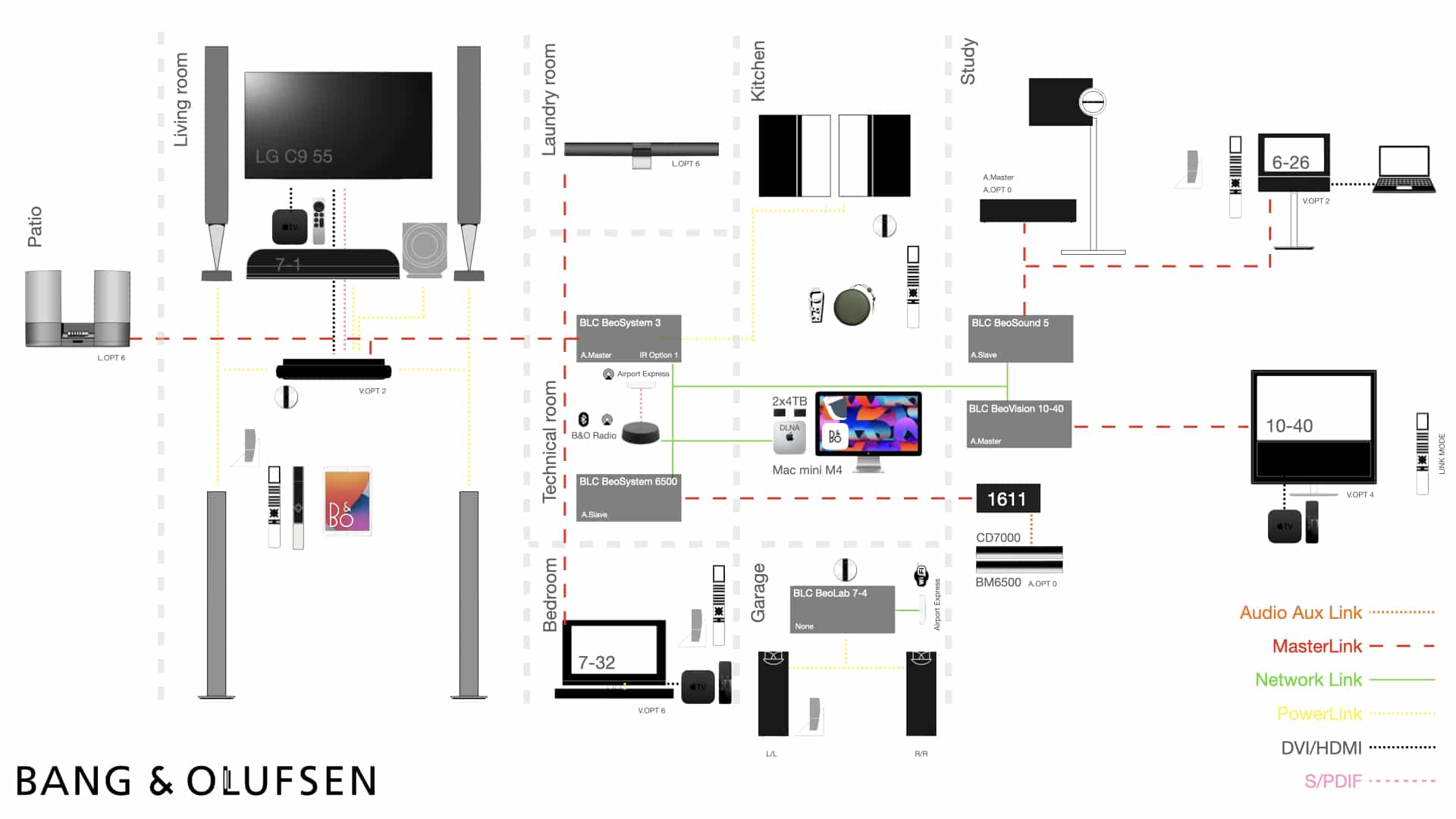
10 March 2026 at 18:46 #76548Hello Dave, with the below set-up that works:
I got it all robustly working with help of kind Beoworld members! It is a bit of a learning curve 🙂Let me know if you need any details.I hope it helps to get to what you want.Regards, JohanLocation: Netherlands
My B&O Icons:
-
AuthorPosts






- You must be logged in to reply to this topic.