






Home › Forums › Product Discussion & Questions › BeoLink › Masterlink – Play button turns whole system off
- This topic has 44 replies, 5 voices, and was last updated 1 day, 15 hours ago by


-
AuthorPosts
-
13 February 2026 at 11:51 #73670
 SILVER Member
Hi all,
I’m experimenting with Masterlink setups at the moment. Currently:
BM6500 > Beolink Converter 1611 > Beolink Passive+ round IR eye > Beovox 3000s
Everything seems to work as it should except that when I quickly press the Play button on the IR eye, or the . button on a Beolink 1000 or Beo 4, the whole system goes into standby rather than just muting the Passive. If I connect a Beolab 2000, the standby button or remote just mutes the BL2000 as it should, rather than turning the whole system off. Any ideas? Passive is in Option 6.
Dave
Location: UK
Favourite Product: Beolab 3000
My B&O Icons:
 15 February 2026 at 13:23 #73842
 MadskpGOLD Member
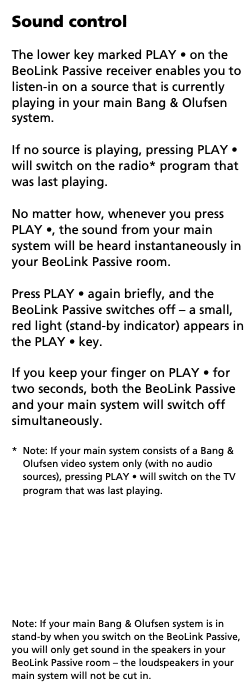
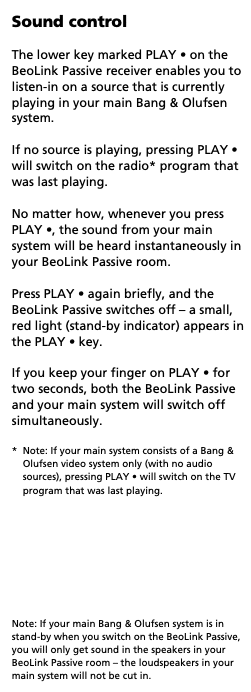
This does sound weird. according to the user manual this should only happen when you do a long press:
Only other place I have found mention of shut-in the whole system of with a single press is in and older manual for the MCL system where you could make a solder connection inside it to get that behaviour. I have not seen mention of this for the ML system components.Have you tried to power up the devices in different order to see if that affects the behaviour? Or do you maybe have an other IR eye you could try with?Location: Denmark
20 February 2026 at 12:15 #74117Hi Madskp,
Thanks for the input. Yes odd indeed. I have now tried (I think) all permutations of turning things on in different orders, and with and without the existing MCL (BL3500) connections to the BM6500 in place, and still no change.
I do have another IR eye and have tried that too, no change. Oddly the standby light on one of the IR eyes does not light up, but it doesn’t seem to make any difference.
Learning from The Princess Bride, I thought it might be helpful to list my relevant assets:
Beosystem 6500
Beomaster 3300, currently in the shed
Beolab 3500, currently wired in via MCL to the BM6500
Beolab 2000, currently doing nothing
Beolink Active 1636 + IR eye, currently doing nothing
Beolink Passive (no idea which version) + IR eye, currently connected via ML+Beolink Converter to the BM6500
MCL2AV, currently not connected
MCL2A, currently not connected
Beolink Converter 1611
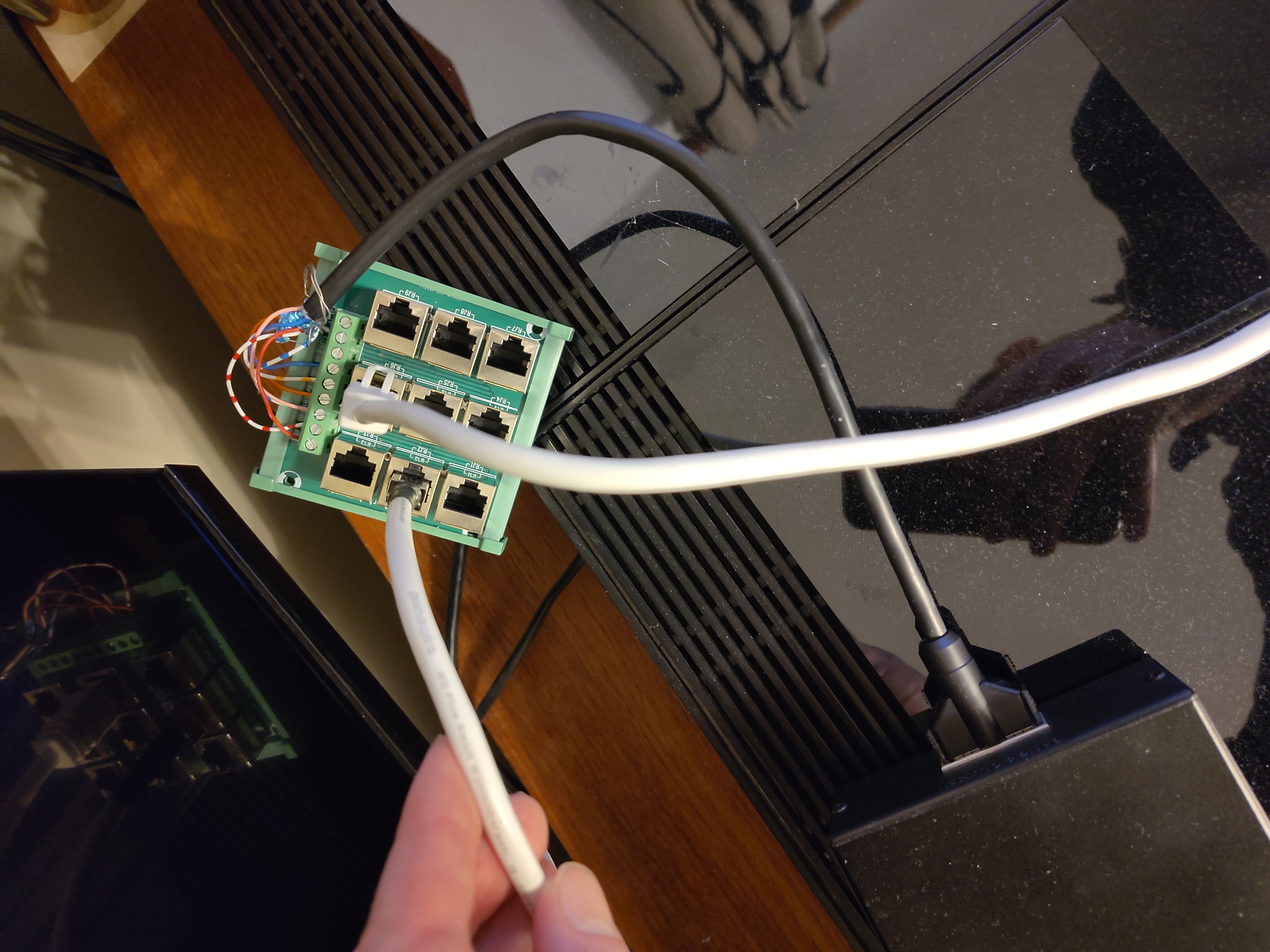
Various original and home-made ML cables including an RJ45 distribution panel
Beolab 4000 Mk1s, currently Powerlinked to the BM6500
Beolab 3000s, currently acting as Beovox 3000s and connected to the Passive.
Various passive speakers (inc C75, BV3800)
I’ve tried the current setup both with my home-made cables and some ‘genuine’ ML cables with and without junction boxes, and same behaviour. I’ve also tried with and without a fully-wired powerlink cable between the BM6500 and 1611, which doesn’t seem to make any difference at all. Currently running it without. 1611 is connected to the Aux port on the BM6500, it doesn’t seem to work at all in Tape which would have been my preference.
Things I intend to try this weekend:
- try the Active at the same time as the Passive, possibly with the BL2000 too, all connected through my RJ45 distributor. If I have sufficient bits of cable.
- get the BM33oo out of the shed and try that connected to the 1611. Not sure if this will work but if it does with the same behaviour it would suggest it’s my 1611 that’s the problem
- maybe try with the BL3500 via ML, though this might be more destruction than I have time and space for.
- I might also try the MCL2A or 2AV with their own rectangular IR eye connected on the far side of the Passive, and see how that works. But that might be a step too far.
Any other great ideas? Writing this all down has been quite helpful in itself.
-
This reply was modified 2 weeks, 5 days ago by
Location: UK
Favourite Product: Beolab 3000
My B&O Icons:
20 February 2026 at 16:52 #74133MadskpGOLD MemberJust a few more inputs based on your post.urrently running it without. 1611 is connected to the Aux port on the BM6500, it doesn’t seem to work at all in Tape which would have been my preference.
The datalink86 bus that is needed for connection to the 1611 is only available in the AUX connector.
try the Active at the same time as the Passive, possibly with the BL2000 too, all connected through my RJ45 distributor. If I have sufficient bits of cable.
What about the active have you tried if that works the same as the passive?get the BM33oo out of the shed and try that connected to the 1611. Not sure if this will work but if it does with the same behaviour it would suggest it’s my 1611 that’s the problem
The BM3300 does not have datalink86, so is not able to work with the 1611.
Also if the Beolab 2000 works fine in the setup the 1611 should be OK.
maybe try with the BL3500 via ML, though this might be more destruction than I have time and space for.
Maybe just try to disconnect the MCL part of the system (remember to turn it all of before you do so), just to rule out if that has any effect on it. MCL shares the same datalink bus as the datalink 86 in the AUX conecetor of the BM6500, so there is a possibility that something could disturb each other
Let us know how your testing goes. Maybe that can make for new inputs to the mystery
Location: Denmark
21 February 2026 at 16:45 #74164Well I’d already extracted the BM3300 from the shed by the time I read your sensible comments about Datalink 86 @Madskp, so thought I’d try it anyway. Of course it doesn’t have an Aux port, just CD, Tape and Phono. I connected a 7-pin from the 1611 to the Tape socket and fired up the radio, then turned on the Passive, and there was sound! I could control the volume on the Passive with the IR eye or Beolink 1000, but could not control the BM3300 through the IR eye which confirms your Datalink thoughts.
Interesting, but I’m not sure whether there’s much practical application for this. You could establish a link room with ‘join’ and volume control only I guess. Perhaps running a pair of active powerlink speakers from the BM3300 rather than Beovoxes, but still a bit of a faff.
Experiments currently underway with the Active/Passive/BL2000. Results so far are consistent, but confusing! Will report back later.
Dave
Location: UK
Favourite Product: Beolab 3000
My B&O Icons:
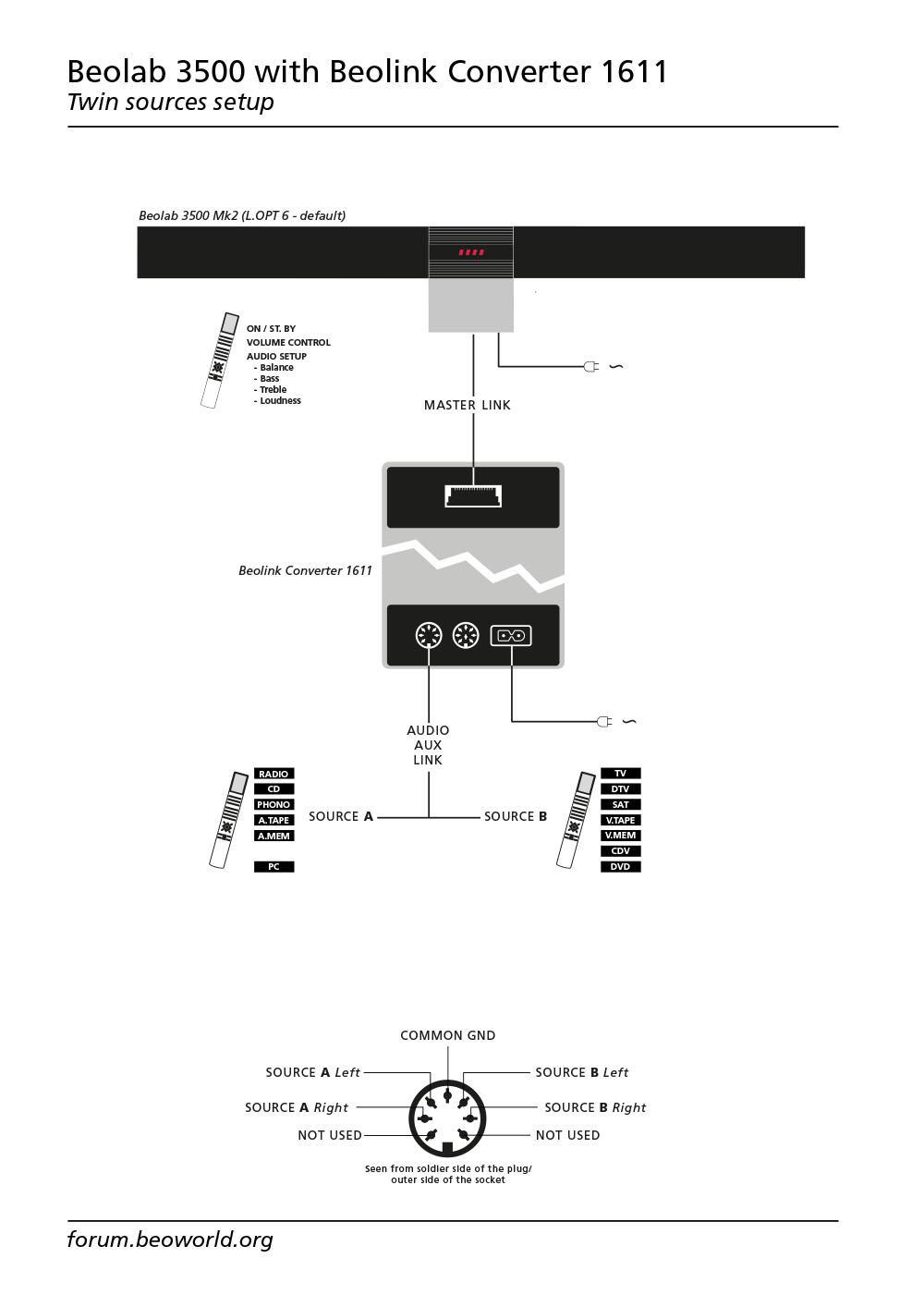
21 February 2026 at 17:26 #74165MadskpGOLD MemberTo explain your observations about the 1611 it csn work as a stand alone audio and video masterthus allowing for two selectable sources on any ML link room product. This was tested very throughly in another thread which among other things resulted in this great sketch made by Matador https://beoworld.org/wp-content/uploads/beoworld_images/24903/fpsantcr1nreqhki1h7n4w2zt2x2471h.jpg
Location: Denmark
21 February 2026 at 21:01 #74176I have been working my way through that thread, there’s lots of good info in there. I’d not really appreciated you could get an output from e.g. the Tape socket on a Beomaster, though I realise now that’s exactly what the Audio Aux Link into a 1611 is all about. There’s a world of non-wife-friendly possibilities with this stuff!
Location: UK
Favourite Product: Beolab 3000
My B&O Icons:
21 February 2026 at 22:00 #74180Results of today’s experiments!
Firstly I was wrong before about the Beolab 2000 working differently to the Beolink Passive. It doesn’t, the results are exactly the same.
I’ve got a long sheet of permutations and results, but they all correlate so far into two scenarios. Setup is:
BM6500 Aux socket > 7-pin ‘Audio Aux Link’ cable > Beolink 1611 converter > Masterlink to RJ45 distribution board* > BL Active/BL Passive/BL2000/BL3500
Results are:
Any one of BL Active/BL Passive/BL2000/BL3500 connected: Pressing the standby button directly or via Beo 4 / Beolink 1000 on the link product turns the whole system into standby
Any two of BL Active/BL Passive/BL2000/BL3500 connected: If both link products are On, turning either of them Off (into standby) works as it should, with the Beomaster and the other link remaining On. But if the second link product is then turned Off (standby), the whole system turns off. This is the same whichever link products are connected, and whichever order they’re switched on or off in. Putting the first link product into standby works as it should, putting the last link product into standby turns everything off.
I don’t (at the moment) have enough bits of Masterlink cable with the right ends to try more than two link products at once, but I suspect the same result: last one into standby turns everything off. As reported above the same behaviour appears with one product and genuine Masterlink cables so I don’t think it’s my home-made RJ45s at fault.
So I still don’t know if it’s my 1611 or my Beomaster that’s at fault, or something else. I have a bid on another 1611 on eBay as that’s the cheaper experimental option! Would like to try with a different AAL- or Masterlink-enabled Beomaster but I don’t have such a thing. At the moment.
- quite pleased with the RJ45 distributor, a few £ from eBay and easy to attach a Masterlink cable to. All shielded/ grounded too.
-
This reply was modified 2 weeks, 4 days ago by
Location: UK
Favourite Product: Beolab 3000
My B&O Icons:
22 February 2026 at 06:16 #74198MadskpGOLD MemberJust some extra notes to be clear:
Do you start the music from the main system or from one of the link rooms, and do you also have the speakers in the main room in use in these scenarios?
I belive if the music is started from a link room the behaviour is correct as long as the main room is not in play.
I will see if I can verify this on one of my systems today.
Location: Denmark
22 February 2026 at 07:43 #74207MadskpGOLD MemberSo I just did some testing with some of my equipment:
Beocenter 9300 – 7 pin datalink cable – 1611 – masterlink cable – Beolab 3500 MK1 both with, and without a powerlink cable between the BC9300 and the 1611.
Beosound Ouverture – Masterlink cable – Beolab 3500 MK1
In bot cases I get the same behaviour as you describe even when I start the music from the master system.
Now what I expected. I will see if I have time to look more into this today
Location: Denmark
22 February 2026 at 09:12 #74212Just some extra notes to be clear:
Do you start the music from the main system or from one of the link rooms, and do you also have the speakers in the main room in use in these scenarios?
I’ve tried all ways, with the same results as above. Starting the music in the main room and joining the link rooms, or starting and listening from a link room only, or starting from a link room and adding the main room in after. All result in the same behaviour. Agreed that this would be correct behaviour if listening in a link room only.
Location: UK
Favourite Product: Beolab 3000
My B&O Icons:
22 February 2026 at 09:25 #74213So I just did some testing with some of my equipment:
Beocenter 9300 – 7 pin datalink cable – 1611 – masterlink cable – Beolab 3500 MK1 both with, and without a powerlink cable between the BC9300 and the 1611.
Beosound Ouverture – Masterlink cable – Beolab 3500 MK1
In bot cases I get the same behaviour as you describe even when I start the music from the master system.
Now what I expected. I will see if I have time to look more into this today
Thanks for trying, and very interesting!
I did wonder if this is how the ML system is meant to work, and rather than pressing Standby in the link room you’re just meant to use the Mute button on a Beo4 or 1000. But I’ve found when trying this that the muted link product then turns itself off after half an hour or so, which in turn puts the whole system into standby. Not great if you’ve moved back from the link room to the main room to watch TV or whatever, and halfway through a show the sound cuts out.
Quite baffling. And not how an MCL system works.
Location: UK
Favourite Product: Beolab 3000
My B&O Icons:
22 February 2026 at 14:20 #74229More conflicting madness from today’s brief experiment.
I added an MCL2A to the far side of the Passive:
BM6500 > AAL > 1611 >ML > BL Passive no IR eye> MCL > MCL2A+rectangular IR eye > Beovox 3000s
Success! System works as it should. Short press on the rectangular IR eye puts only the Passive into standby, Long press puts the whole system into standby. With Main and Link rooms on, muting the BM6500 mutes only the main room, not the link room. Volume control independent in both rooms. Huzzah! Interestingly the rectangular IR-eye wakes the Passive and turns the sound on instantly, without the delay of a couple of seconds for the round IR-eye into the Passive.
Everything continues to work fine with the BL3500 back in MCL mode and connected direct to the BM6500, independent control of both link rooms and the main room without conflict.
I tried also plugging the round IR eye into the Passive too at the same time as the MCL2A. In this case the rectangular IR still works but the round IR does not. I guess using the MCL plugs tells the Passive it’s meant to be a ML/MCL converter and disables its IR port.
Still baffled though!
Location: UK
Favourite Product: Beolab 3000
My B&O Icons:
22 February 2026 at 15:55 #74232MadskpGOLD MemberInteresting enough that it seems to work when converted to MCL.
But according to the user manuals for at least the Active, Passive and BL3500 it should work as the MCL did:
From the BL3500 user manual
Location: Denmark
22 February 2026 at 19:02 #74236TKBRONZE MemberThanks for the research! Just based on my own minimal experimentation with Datalink Links, I’ve not seen anything within Datalink to monitor and keep track of the number of currently active/playing link zones in the system, so your experiments are of interest to me.
Most of my monitoring has been on the “Primary” Datalink bus (by that, I mean any component connected directly to the BM, such as an Aux unit or MCL2A). I’ve yet to monitor and document Datalink traffic between an MCL2A and the IR sensor – this appears to also just be Datalink protocol, but perhaps it is formatted a but differently. As a guess, I imagine that B&O does it somewhat as follows: The MCL2A interprets a “Mute” signal from the Sensor as “Zone Off” (sent via a short button press) and interprets a “Standby” signal (from a remote, or long button-press) as “System Off”. That being said, this alone would not be enough to cause the last active Zone in a multi-zone system to know to forward a “Standby” command to the BM when it is Muted. If I ever get a second zone put up for testing, I’ll be able to definitively see how this handshake works.
22 February 2026 at 21:24 #74241Thanks for your interest too, TK. I thought of a thing that might be relevant to our query @madskp, and while looking it up saw a thing that might be relevant to @TK too.
At the moment I have no genuine junction boxes in ML cables, so there’s no shorting between pin 3 (wh/bl, ‘ML sensor’) and pin 12 (pink, ‘+supply voltage’), as recommended on pages 34 & 35 of this Masterlink handbook. I should be able to do this fairly easily at my distributor but not for a couple of days. Do you have the short circuit in your setups, @madskp? No idea if this is actually relevant or not.
Secondly, on that page 35 it mentions ‘Data speed is 19200 bits/second. By comparison, Master Control Link data speed is 160 bits/sec’. I’m well out of my depth here, but does that imply that ML and MCL data signals are a different ‘language’, if you’ll excuse the term? And does that imply that the IR signal from a Beo4 / Beolink 1000 is a different ‘language’ too? Here’s my schematic thinking:
Beo4 / Beolink 1000 – Language A
MCL – Language B
ML – Language C
Beomaster 5500 onwards – Language A
So sending a standby signal to the link room in my most recent experimental setup might do this:
Beo4 > Language A > Rectangular IR Eye translates to Language B > MCL2A > Language B > into Beolink Passive acting as ML/MCL converter, which translates to Language C > Beolink Converter 1611 which translates back into Language A > Beomaster 6500
Without the MCL2A this might go:
Beo4 > Language A > Circular IR Eye translates to Language C > Beolink Passive > Language C > Beolink Converter 1611 which translates back into Language A > Beomaster 6500
In my scenarios here it is the translation of the standby signal from A to C in the Round IR Eye that is going wrong and causing the incorrect standby command to reach the Beomaster.
Of course (a) this might all be rubbish, and (b) it doesn’t explain the ‘correct’ behaviour at times when two ML link products are connected.
Location: UK
Favourite Product: Beolab 3000
My B&O Icons:
22 February 2026 at 23:35 #74244TKBRONZE MemberI’ve done a fair amount of documenting on all things MCL/MCL2, and almost nothing on ML. Here’s what I can add to the conversation. This is all probably not exactly 100% accurate, but IMHO it’s probably reasonably accurate for the purpose of this discussion. Here’s a primer:
- Beo4, Beolink 1000, Master Control Panels, Beolink 7000, MCL2AV + sensors, Pentas, several other Beolabs, and BeoMaster 5500-9300 – any peripheral with a Powerlink plug, as well as some of the all-in-one tabletop boxes, all can communicate with one-another using Datalink ’86, or MCL2 for short.
- Some newer components have both a Powerlink and a MasterLink connection, in which case they broadcast/receive both ML and MCL2.
- Newer-still components dropped the Powerlink connection, in favor of just ML. To attach an MCL2 system to it, you’d need buy some B&O converter to add inter-connectivity.
- The Beo4 and Beolink 1000 use the simplest MCL2 format, designed for 1-way communication, which I call “AC” format (“Address-Command”). A Slew of B&O systems can understand and act on these commands. Anything which can be directly controlled using a Beo4 can effectively decipher one-way MCL2.
- The MCP and the BeoMaster 5500-7000, and the 9500 use a myriad of 2-way communications formats of various types and data lengths. Only systems designed to handle 2-way communication protocols can act on these messages. These formats are all part of the MCL2 protocol, and are defined as MCL2. Only some B&O systems are designed to decipher these more advanced 2-way protocols.
- The MCL2AV appears to be primarily an MCL2 Gateway between the BM and a sensor. It will pass through most of the data it sees on the bus in a 2-way fashion, regardless of whether it’s a simple or advanced MCL2 message. If it’s identified as being an MCL2 structure, it will send it onwards. When it sees a few select commands come from the sensor that it understands, like a source selection, Play/Mute/Standby, it turns it’s own speaker pair on or off, and plays whatever is on L&R channel, or it’s own inputs, depending on how it’s set up. One might say it’s kinda/sorta like a limited-function BeoMaster.
- The BL7000 uses the most sophisticated variant of MCL2, which AFAIK only it and a BM7000 can encode/decode into meaningful messages (although it is backwards compatible for message transport purposes, and can still be seamlessly passed through any of the attached linked systems, including an MCL2AV, as far as I’ve been able to test).
- For the sake of completeness, there is also an earlier protocol called MCL’82 that predates Datalink ’86 (I personally refer to it as just “MCL”, which is not really accurate), which AFAIK is only used on the BM5000 and its BM5000 Link peripherals, with some limited cross-compatibility with the BC7000.
Based on my research, MCL2 is a very robust and flexible/extendable system, with one major drawback – It ran at 320 baud. This meant it can take up to a second or two to send a full complement of system status messages. IMHO this was a bonafide revelation in the mid 80’s but totally antiquated by the mid 90’s. For example, implementing RDS on the BL7000 involved sending three messages at .5 seconds each, and takes almost 2 seconds to send just 10 characters of data, with header/control information in tow. Imagine if you had to send a CD’s worth song names over MCL2 – it could take a minute or more, and clog up all the transmission/control lines in the mean time.
I have not yet dug into ML and its underpinnings, but at some point I’ll look into it. I can only assume they solved all of these speed issues.
-
This reply was modified 2 weeks, 3 days ago by
 TK.
TK.
23 February 2026 at 00:11 #74246TKBRONZE MemberUsing your example above, given my understanding of MCL2 and the MCL2AV, I think what is happening might look more like described below. I’m going to ignore for the moment the IR piece, which I think can be viewed as another way to send and receive MCL2:
Beo4: MCL2 (One way) Sends wireless MCL2
BM5500: MCL2 (One and two-way) wired MCL2 through Speakerlink. Also has its own wireless MCL2 gateway, which you can turn “on” or “off”, depending on your setup.
MLC2AV: MCL2 wired Gateway (One and two-way); sniffs out a few select MCL2 commands to act on, such as Mute and Play. Can send and receive MCL2 to the BM, or towards the Sensor.
Sensor: MCL2 wired-to-wireless Gateway (one and two-way); converts wired MCL2 into wireless MCL2, and vice-versa. Collects IR data from whatever remote is sending in the room, and passes it to the MCL2AV. Can also receive wired MCL2, convert it to IR protocol, and broadcast to the room. Has a few physical buttons used to inject pre-programmed MCL2 commands onto the wired network towards the MCL2AV gateway, such as “Mute” and “Standby”.
This is just the MCL2 piece. Then there’s an ML piece, of which there’s a Gateway which can convert MCL2 into ML, and vice-versa. From what I recall, these components were in constant development, so it’s important to get one that has the absolute latest firmware release, which can correctly translate the most messages correctly.
-
This reply was modified 2 weeks, 3 days ago by TK.
23 February 2026 at 16:43 #74269Just a general note in this discussion:
- only BL Passive is active with a source of the BM6500. STBY will switch out all
- BM6500 is local active as is the same source on the BL Passive. STBY in the room with the BM6500 should mute the BM6500.
- BM6500 is local active as is the same source on the BL Passive. STBY in the link room with the BL Passive should put the BL Passive in STBY.
So be very sure that de IR of the BL Passive and the BM6500 do not receive the signal at the same time.
Normal in ML : short STBY will stop only the product in the room addressed. Long STBY will put the whole system in standby.
23 February 2026 at 17:20 #74272MadskpGOLD MemberDo you have the short circuit in your setups, @madskp? No idea if this is actually relevant or not.
I am not sure. Most of my stuff is in a non permanent setup, so I often switch cables between different units. I will try to check up on this when I have some time, probably in a couple of days.
Normal in ML : short STBY will stop only the product in the room addressed. Long STBY will put the whole system in standby.
That is also what the manuals for the link products describe, so even more puzzling that I can reproduce this issue with two different Audio Masters.
Will also try to look into trying with other components if the above does not change anything.
Location: Denmark
-
AuthorPosts




- You must be logged in to reply to this topic.