






Home › Forums › Product Discussion & Questions › BeoVision › Masterlink issues: Beovision MX8000 – Beosound Ouverture for DVD audio
- This topic has 4 replies, 3 voices, and was last updated 4 months ago by
 Madskp.

-
AuthorPosts
-
21 November 2025 at 11:45 #71433
 neil.mcdowellBRONZE Member
Afternoon,
I’d like to check my options for Master Link between my MX8000 and Ouverture system.
I have a pair of 6000 speakers connected to the Ourverture, but would like the option to play TV/DVD audio through these speakers.
I can do the opposite: I can use (Beo4) AV -> Go -> Radio/CD/etc to play Ouverture sources through the MX, but not the reverse.
Most guides seem to suggest that I should connect the speakers to the TV. Is this my only option?
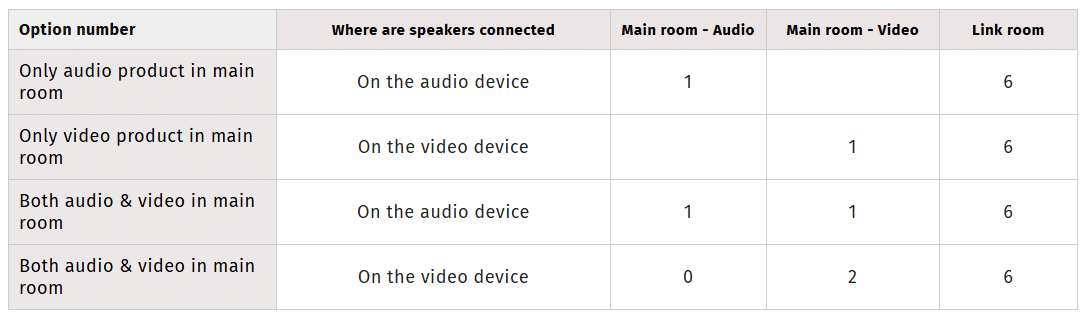
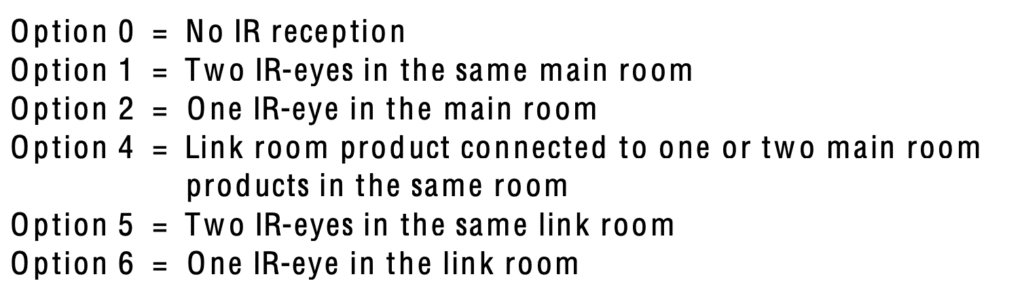
For this is I should use A.Opt: 0, V.Opt: 2
Following the table below I have tried A.Opt: 1, V.Opt: 1, but not sure what else to do after that.

 The MX8000 manual refers to a CD-ROM for additional settings, but I have so far not found this material online.I do have a Beolab 2000 in a linked room which is working just fine: Hit DVD from the Beo4 and I have TV/DVD audio.What else can I try for my main room setup?Thanks in advance, Neil21 November 2025 at 16:01 #71445
Then,
To get DVD:
- On the 8000: DVD
- On the Ouverture AV+DVD
To get Radio:
- On the Ouverture: Radio
- On the 8000: AV+Radio
If your preferred listening position is the same for audio and video, the best solution would be to hook the speakers to the TV.
If my memories are good, you could take benefit of the “central balance” function to enlarge the video stage
And this case, the AV key on source while selecting a source is no more necessary.
Hope this helps.
Regards,
Yann.
PS: is the MX directly connected the Ouverture or is there a black box (converter) between the 2 products?
Attachments:
You must be logged in to view attached files.Location: Brittany, France
My B&O Icons:
21 November 2025 at 17:34 #71453MadskpGOLD MemberFor the most user friendly operation speakers connected to the MX8000 in option 2 and then the Ouverture in option 0 is recommended.
Else you will have to have both in option 1 and control it like Yann suggest.
PS: is the MX directly connected the Ouverture or is there a black box (converter) between the 2 products?
The MX8000 has the possibility to have en optional ML module which I guess is the case here as the MX8000 does not have and Audio Aux Link connector as previous models.
Location: Denmark
25 November 2025 at 16:27 #71541neil.mcdowellBRONZE MemberOk, played around a little, but not made much progress unfortunately…
on some points raised, yes the MX8000 is equipped with the Master Link module.
It is however not connected directly to the Ouverture, instead there is a 4-way ML Junction box sitting between the TV, Ouverture and a Beolab 2000 (link room).
Idid install the junction box myself, but checked continuity across all links in the junction box, can access TV audio from the BL2000 module, and play CDs/Radio on the Tv as Yann described.
Following the instructions for DVD audio on the Ouverture, AV + DVD puts it into V.AUX mode, and the speakers switch on. Volume is adjustable without interfering with the TV, but alas, no audio.
If I put the DVD player/TV into standby mode, the Ouverture doesn’t follow suit, and instead is active until shut down.
Not sure if that helps with anything…
Appreciated, Neil
25 November 2025 at 17:36 #71542MadskpGOLD Memberon some points raised, yes the MX8000 is equipped with the Master Link module.
It is however not connected directly to the Ouverture, instead there is a 4-way ML Junction box sitting between the TV, Ouverture and a Beolab 2000 (link room).
Idid install the junction box myself, but checked continuity across all links in the junction box, can access TV audio from the BL2000 module, and play CDs/Radio on the Tv as Yann described.
The junction box should not matter as long as you can get the sorces between the units.
Following the instructions for DVD audio on the Ouverture, AV + DVD puts it into V.AUX mode, and the speakers switch on. Volume is adjustable without interfering with the TV, but alas, no audio.
Maybe double check the audio connections to the Ouverture in the junction box (red/red-white and orange/orange-white wires).
If I put the DVD player/TV into standby mode, the Ouverture doesn’t follow suit, and instead is active until shut down.
Try to hold down the standby button for a few seconds to shut down the whole system.
Location: Denmark
-
AuthorPosts


- You must be logged in to reply to this topic.