






Home › Forums › Product Discussion & Questions › BeoSound › Beosound 9000 with 3x BeoLink Passive zone issues?
- This topic has 29 replies, 6 voices, and was last updated 1 month, 3 weeks ago by
 James Powell.

-
AuthorPosts
-
12 November 2025 at 19:51 #71120
 James PowellBRONZE Member
When I initially set up I had the beolabs playing by using the remote and then pressed play on the ir eye. After I disconnected the beloabs I used the remote to control the ir eye.
Only two things occurred between it working and not. I used the remote to turn on a non-b&o tv, and an electrician changed a dimmer switch.
The IR eye had a loose connection so I replaced the lead for a new one. I find it odd how the IR eye is receiving a signal from the remote (it blinks when I hold the OFF button or blinks when I follow the process you showed above) but cannot process a proper command. I am tempted to purchase another masterlink cable to see if it is the problem?
13 November 2025 at 17:33 #71149MadskpGOLD MemberWhen I initially set up I had the beolabs playing by using the remote and then pressed play on the ir eye. After I disconnected the beloabs I used the remote to control the ir eye.
Just to be sure about the setup: Is it correct that you do not have any speakers connected directly to the Beosound 9000?
Only two things occurred between it working and not. I used the remote to turn on a non-b&o tv, and an electrician changed a dimmer switch.
Hard to say if these things could have affected anything, but anything is possible.
The IR eye had a loose connection so I replaced the lead for a new one. I
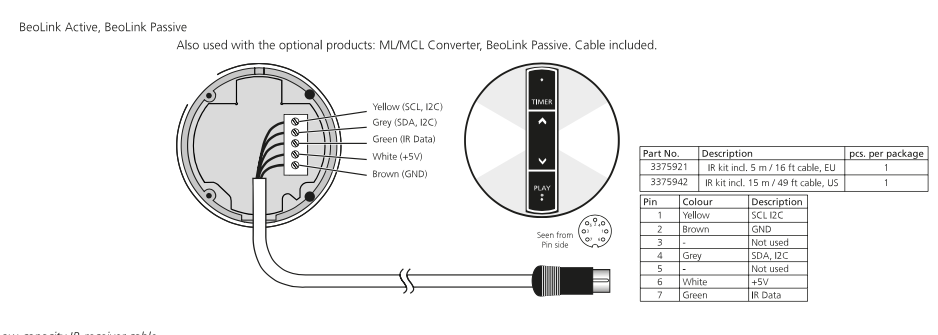
Did you replace the lead with an original one with the same color coding? If so did you double check that all the wires are connected correctly and that there is no strain from any of the wires touching anything than its dedicated screw terminal in the IR eye?
Link to connection drawing here https://forum.beoworld.org/wp-content/uploads/beoworld_images/19037/5tq0lkuk2cjvunxl14bj3g0zpr5wz9e0.png
find it odd how the IR eye is receiving a signal from the remote (it blinks when I hold the OFF button or blinks when I follow the process you showed above) but cannot process a proper command.
I think that the IR eye might be able to react if just ground and 5V is connected, but if there is an issue with the data wire the signals might not be passed, so it is possible that there can be an issue with connections as mentioned before.
I am tempted to purchase another masterlink cable to see if it is the problem?
Also worth a try, but I would suggest to check the above first
Location: Denmark
14 November 2025 at 07:33 #71164James PowellBRONZE MemberI do not have any speakers connected directly to the 9000.
Lead replaced with one from a B&O registered dealer. I will double check connections.
Thanks again Madskp – much appreciated
14 November 2025 at 18:37 #71172I do not have any speakers connected directly to the 9000.
Lead replaced with one from a B&O registered dealer. I will double check connections.
Thanks again Madskp – much appreciated
Out of curiosity, why do you use a Beolink Passive with an IR eye in the same room as the BS9000?
14 November 2025 at 18:51 #71174MadskpGOLD MemberOut of curiosity, why do you use a Beolink Passive with an IR eye in the same room as the BS9000?
That also crossed my mind. Potentially the Beolink passive can also work as and amplifier connected via Powerlink to the BS9000 and no IR eye connected. The Powerlink cable has to be a MK2 fully wired Powerlink for it to work though.
Location: Denmark
17 November 2025 at 07:51 #71316James PowellBRONZE MemberI have ceiling speakers connected to the passive in my kitchen and the 9000 is displayed on the wall there. My beolabs are destined for another room.
24 November 2025 at 13:16 #71524James PowellBRONZE MemberIf I press A.MEM on the beo4 the 9000 will turn on and display A.TAPE – I thought this option only responded if something was connected to it? ie many years ago I had a B&O TV connected to my system and pretty sure this ran off A.MEM
24 November 2025 at 14:36 #71525I have ceiling speakers connected to the passive in my kitchen and the 9000 is displayed on the wall there. My beolabs are destined for another room.
1)
I’m right with the next ACTUAL setup in your kitchen:
BS9000 without BL connected – ML connected to a Beolink Passive with an IR-eye.2)
Before the setup was:
BS9000 with BL connected (but placed in another room) – ML connected to a Beolink Passive with an IR-eye.if 1) is active all BS9000 sources should work (Radio, CD) in the kitchen. Note: if you start AMem it is normal the BS9000 shows A.Tape (A.Mem = A.Tape) and because the BS9000 doesn’t support Datalink on the AUX port it can not check if a source is available on that port, so it must open it (always).
if 2) is active you will get a strange mess-up if the BS9000 is set in option 1 or 2 AND the BL Passive in option 5 or 6. The IR signals will received though the BS9000 and the BL Passive at the same time. For example if you want to go to the next CD track, you will end to skip the next track and will get the track thereafter.
The sole solution will be to place the BL Passive in option 4.But still if you want to play the BS9000 CD in the other room, you have to go to the kitchen to start to play the BS9000 CD (with a remote). If you want to play the BS9000 CD solemnly in the kitchen you have to start it with the LINK CD command on a remote. And thereafter if you want to add the other room, you have to give the CD command in the kitchen to the BS9000.
I would say a confusing setup.
The best would be: Powerlink connect the BL Passive tot the BS9000 (same room = kitchen) and add a BL Active (with IR) with the BL connected to it, in the other room.
26 November 2025 at 10:59 #71556James PowellBRONZE Memberhi Carolpa,
Correct, 1 is the setup. Yes, confusing, wish I had planned it better and currently not working! 😂 . I agree with your setup idea.. wish I had come on here before starting.. Thanks for your help
1 February 2026 at 16:46 #73023James PowellBRONZE MemberI’m back.
I replaced the IR eye and also the passive – Nothing!
I bought a new masterlink cable. Initially nothing.
I took a speaker out of the ceiling and and made a new connection to the passive (I had disconnected everything prior to this so needed to reconnect).
Bingo! Life. It seems to be the masterlink cable. (Although the left port speaker connection is also faulty)
However, the IR eye will not receive anything from my controller… Also, I can only listen to the radio.. when I select “CD” no sound is played.
Any ideas? (Thanks)
-
AuthorPosts

- You must be logged in to reply to this topic.