Generic selectors
Exact matches only
Search in title
Search in content
Post Type Selectors

Home Forums Product Discussion & Questions BeoLab Beolab 2500

Viewing 5 posts - 1 through 5 (of 5 total)
  • Author
    Posts
  • #51626
    Ipe
    BRONZE Member

    Hi

    Found old Beolab 2500 speakers and they are in very good condition.

    except …….

    no light, no sound, no nothing…..

    Transformators seem to be ok but that’s about it.

    Any suggestions or similar experiences??

    Ipe

    Location: Finland

    #51627
    auric
    BRONZE Member

    Ipe:

    There should be a red standby led when you plug the unit in.

    The powerlink has a 5v trigger which comes from the Beocenters and tells the speaker to turn on at which point the led changes color to green. So for it to play you need to send an audio signal as well as the 5V trigger.


    But if you are getting absolutely nothing… start with the power supply.  Maybe a fuse?

    Is the cord plugged all the way in? The receptacle is in a very awkward location and its  not always easy to plug the cord in properly.


    Derek

    #51628
    Ipe
    BRONZE Member

    Yep, I’ve checked fuses etc. Power comes out from transformer but that’s it.

    Both speakers the same. Tried to connect those to other B&O devices also with same result.


    Location: Finland

    #73551
    michael.cosgrove
    BRONZE Member

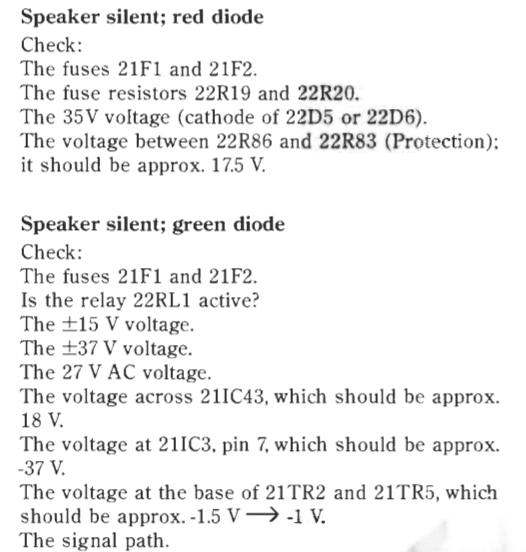
    I am wondering how this post came out.  I have BeoLab 2500 speakers which have been in storage for perhaps 20 years.  After setting the system up one speaker works fine, the second (left) has consistent red light with no sound.  I have confirmed all cables, plugs, etc., looked for a burned fuse and which is not there (not a replaceable glass fuse), and am now at a loss as to what to do.  Are there any published steps for trouble shooting or testing the electronics?  Is the circuit board available to replace if necessary?


    Thanks for any help,

    Mike,

    USA

    #73553
    pl212
    SILVER Member

    Let’s see, there is this brief troubleshooting guide in the service manual:

    Location: Silicon Valley

    My B&O Icons:

Viewing 5 posts - 1 through 5 (of 5 total)
  • You must be logged in to reply to this topic.