






Home › Forums › Product Discussion & Questions › BeoGram › BEOGRAM 5500 stutters and bounces on return
Tagged: 5500, return at end of play, wire guide
- This topic has 10 replies, 3 voices, and was last updated 1 month, 3 weeks ago by
 kknyc.

-
AuthorPosts
-
16 January 2026 at 21:19 #72605
 kknycSILVER Member
HI Beoworld,
After replacing all rubber parts, fixing guide wire, and getting a new cartridge. I noticed something that I’m so far unable to correct:
At the end of record play the arm returns, slightly ‘shutters’, then bounces of the end of travel only to floating back into the platter area.
Ive tried adjusting the “eccentric B wheel” as well as F and G adjustments, the start of play is correct for both sizes. It just seems like the return speed is too fast?? —making the arm want to bounce back. (see vid) IF I then re-press play, it will play correctly. If I stop it before the end of the record, it will return with a shutter but no bounce. (see end of vid)
Note: Using the <<, >> during play works fine but that <<,>> speed is much slower than the ‘end of play’ return speed.
Could this have anything to do with the photo LED light? or just a mechanical adjustment?
Im new to all things B&O so I appreciate any thoughts, ideas, direction I can take. Thanks in advance for your suggestions.
Attachments:
You must be logged in to view attached files.My B&O Icons:
 16 January 2026 at 23:54 #72616kknycSILVER Member
BEOGRAM 5500 arm
BEOGRAM 5500 stutters and bounces on return https://forum.beoworld.org/wp-content/uploads/sites/3/2026/01/BEOGram-5500-bounce-stutter.mov
stutters and bounces on return https://forum.beoworld.org/wp-content/uploads/sites/3/2026/01/BEOGram-5500-bounce-stutter.mov
My B&O Icons:
17 January 2026 at 20:56 #72663Looks to me that you have got the gears aligned underneath when you reassembled. There is a procedure explained in the service manual.
17 January 2026 at 21:16 #72664kknycSILVER Memberhi, thanks for the suggestion. (I never disassembled the gears just replaced belts). I followed the SM 5.1 to set the gear, then attached the wire guide.
Is there more to the procedure? —Hmm, I feel like Im missing something
Attachments:
You must be logged in to view attached files.My B&O Icons:
28 January 2026 at 18:14 #72924DillenModeratorTwo cables run from the muting board to the carriage.
They go under a black plastic holding bracket.
At the bracket pull the cables just 3-4mm towards the carriage – add a dap of glue to them at the bracket, if they won’t sit by themselves in this new position.Martin
28 January 2026 at 18:52 #72927kknycSILVER MemberHI Martin, Thanks so much for the tip, I’ll try that today.
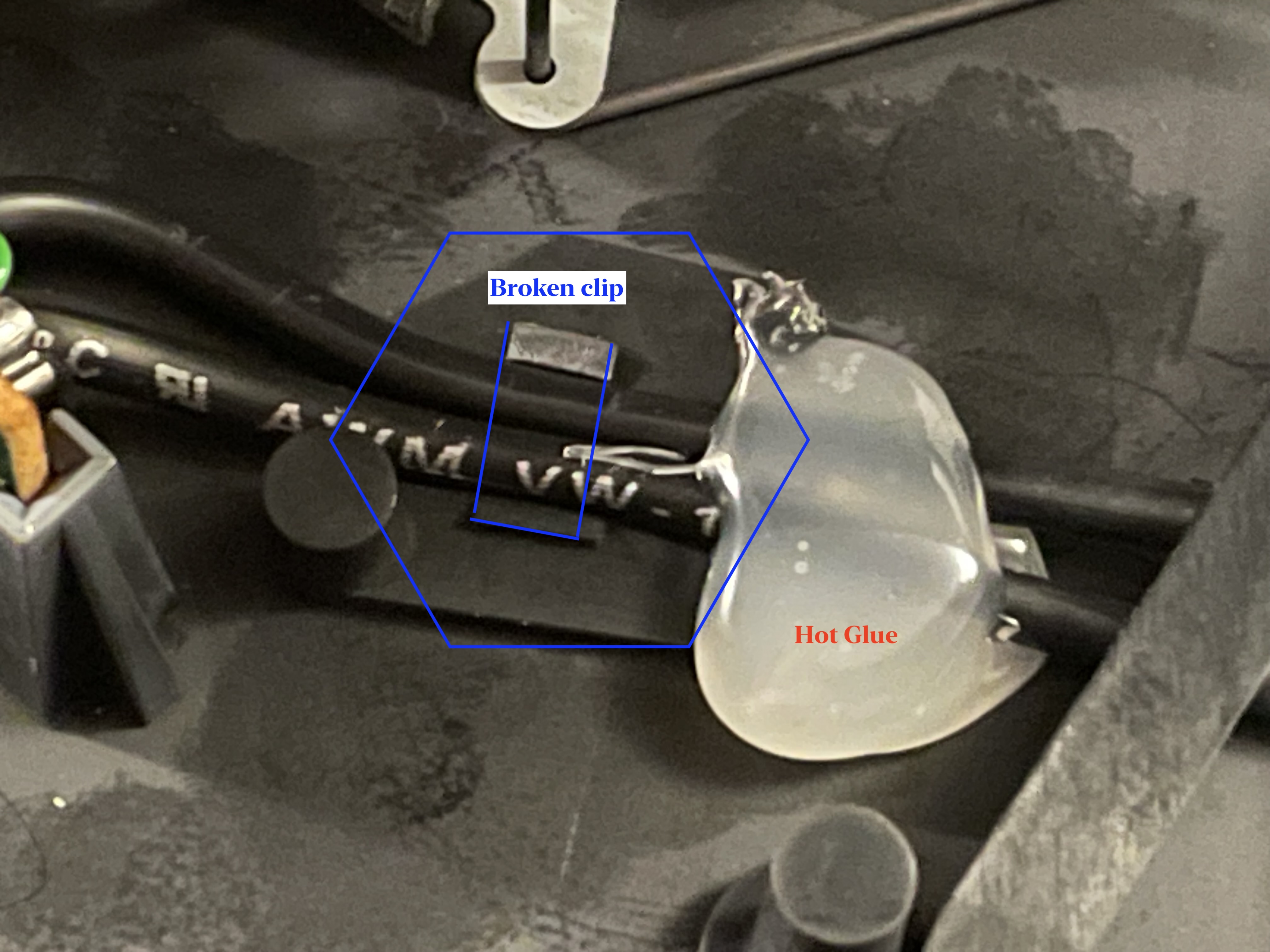
I had to re-read it a few times to ‘visualize it’, but now that I think about it there was a thin black plastic ‘cable harness clip’ under there that was dried out and broken—I figured no worries since there was still that ‘black screen’ holding the cables down out of the way of travel. I try a dab of hot glue (in hopes it could be removed if needed)
Please let me know if Ive misunderstood your suggestion,
Thanks K
PS—open to any all glue/adhesive suggestions.
And does anyone have any suggestions for BEOs dried out plastic parts? Is there a way to revive them (ie 303 spray?) or maybe I should just 3d print new ones? (its just chore for each custom one-off part)
Attachments:
You must be logged in to view attached files.My B&O Icons:
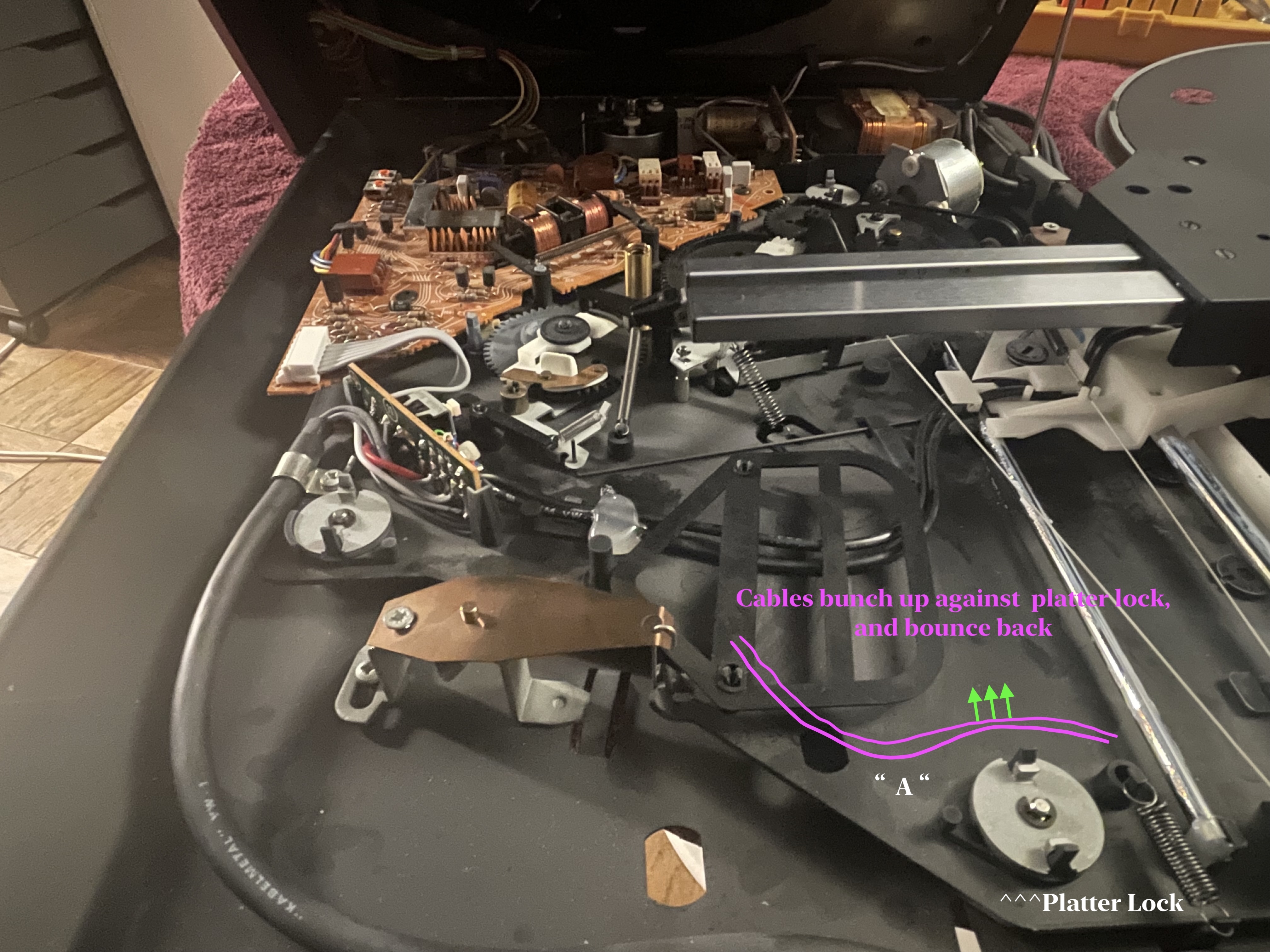
2 February 2026 at 00:27 #73086kknycSILVER Membertoday I finally got a chance to open up the Beogram again. Without that clip, you could see the cable bunch up (at “A”) against the Platterlock then bounce back after the arm return ends.

@Dillen Thanks for the tip, I hot glued the cables (adjusted by the clip dents in the cable)—it helped some, the bounce is less. 👍
I’d love to find a new/nos/replacement clip(s), Please let me know if anyone knows of a source or has 5500 parts for sale. Thanks
While this helped. theres still a little ‘stutter’ at the end of travel. It sounds and looks like the gears are still trying to push the arm after its reached its ‘end of travel’ (see attached vid clip). This is my 1st B&O so I have no idea what the ‘norm’ is, could an experienced ‘Beo owner’ confirm…
- is this a normal return? (speed seems fast)
- Are there any marks on the gears (like a car engine) to set ‘top dead center’ so the gearing and ‘end of travel’ is calibrated?
- Is there a way to set the ‘end of travel’? (I only see stylus ‘set down’ points in the Service Manual as an adjustment)
Thanks for an insights
<PS Lastly, how do we add vid clips in the posts in this forum? —I can’t seem to figure that out 😅>
Attachments:
You must be logged in to view attached files.My B&O Icons:
4 February 2026 at 22:40 #73231Those adjustments are spelled out in Sections 5.1 and 5.3 of the service manual.
4 February 2026 at 22:44 #73232kknycSILVER MemberHI Mark, Yes, as stated earlier thats what I followed. Could you add anything from your own experience that might help?
Could you offer any insight to the questions I asked in my previous post?
is this a normal return? (speed seems fast)
My B&O Icons:
5 February 2026 at 16:39 #73268It looks like a normal return. The electronics cannot fail in a manner that would only speed up the return.
5 February 2026 at 17:08 #73269kknycSILVER Memberhi Mark, thanks for the reassurance👍.
I’ll revisit and repeat the steps in 5.1 (steps in 5.3 are correct as the ‘Pickup Arm Set-down‘ points are correct to the mm). Maybe the arm location was incorrect when I reattached the wire guide?
My B&O Icons:
-
AuthorPosts


- You must be logged in to reply to this topic.