Hello. I have a Beosound Moment, Mac mini & time capsule. I Can not see my playlist on BM from iTunes!? I dont want deezer. Just My iTunes Music. Can someone help me With this?
Thank you to our Sponsors
iTunes on Beosound Moment
21 replies
Are you running Twonky Server on your Mac Mini, and pointing Twonky Server to your iTunes Music folder (or whatever folder contains your library?), if so, give it time, your "standard" playlists should show up in Beomusic (vis a vis on the Moment). Unfortunately, Twonky doesn't "register" or display smart playlists.
But before all that, have you gone through the initial setup process with your Moment? Pointed it at your music server device (whatever that may be -- your Mini running Twonky)?
Welcome to you,
I follow Sal herein, also take your time and read the manual carefully.
I made it available to everyone
I run Twonky server. I have not seen that manual before. I did not came With My BM...!? I am sure i have made a mistake. I am sure i pushed "mediaserver" insted of "iTunes"...!? I have just made a factory reset and Will see if that helps... Maybe you beautiful B&O experts just saved My Christmas!!!!! :-) I Will come back With an answer :-) THANKS :-)
Please notice - if you ask for 'pictures of the correct way in Twonky' to be send to an external site (= Facebook) not everyone may benefit from the solutions. Why not just keep the conversation on the forum?
MM
Location: Flensborg————Danmark
Is there anyone who knows the correct way to have the itunes numbers on a mac in twonky!?
Hi,
You are asking desperate for help, and we will be glad to give it to you as much as we can.
MM mentioned already, that in no case we are planning to help you on Facebook, Beoworld is an excellent portal to help you and we don’t need Facebook for it.
But in asking for help you have to provide us with detailed information about your setup, nobody can help you on your question in a way you formulated it now.
Let me give you some first hints, and provide us with more detailed answers:
A) have you downloaded Twonky server of the B&O site together with a key?
B) have you installed Twonky server on your Mac (What Mac?) and is it running? Do you notice the Twonky icon in your Mac’s top menu bar?
C) if Twonky server is running on the Mac, do you understand how its working? Do you understand the GUI? Have you given your Twonky server a name? Did you point Twonky server to your music directory?
D) in opening the Moment’s menu, can you see the Twonky’s server given name under the menu tab ‘Add your content’ ?
Hello Chris Thanks for response. First some Quick answers to Your questions: A yes B yes, Mac mini and always on. Yes the Twonky icon is on the top menu C no no yes dont know D yes
is it posible to see Your Own playlist from iTunes (NOT Deezer) on the moment using Twonky!?
why does it take more than 3 days (Then i gave up) to download the iTunes files to moment!? There
is almost 6000 Music Numbers... I have tried both cable internet and wifi...
i Really hope i Can get it soon to work :-)
i only asked for pictures on Facebook because i am not sure My Twonky plug-ins Are correct
thanks Anders
Hi,
You have given some interesting answers on my C questions:
C) if Twonky server is running on the Mac, do you understand how its working > NO? Do you understand the GUI > NO? Have you given your Twonky server a name > YES? Did you point Twonky server to your music directory > DON’T KNOW?
I try to answer them with some pictures.
- Click right at the top menu icon, and open click Twonky Server settings. You get this:

In the window click on Sharing:
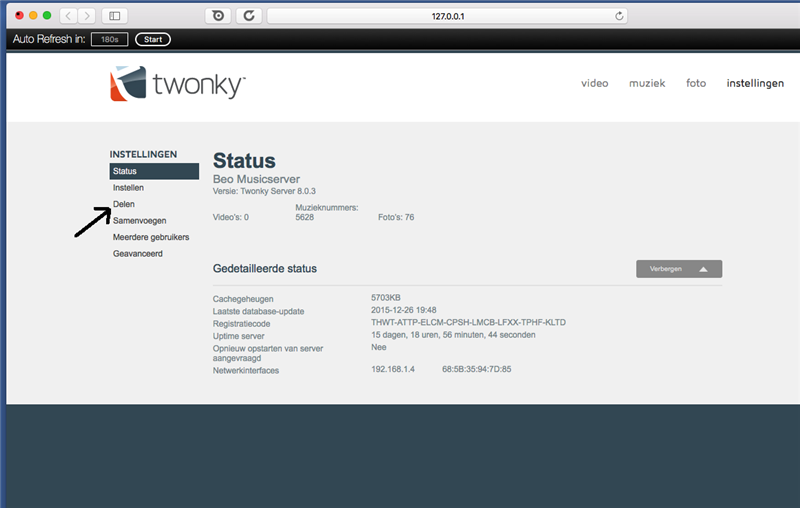
In the window that now opens, you point (browse) to YOUR music directory, in my case (careful, I don't use iTunes!) its /users/... Now save this settings.

Click the MUSIC tab, and in a short while you must see all your music appearing, if not reload the window.
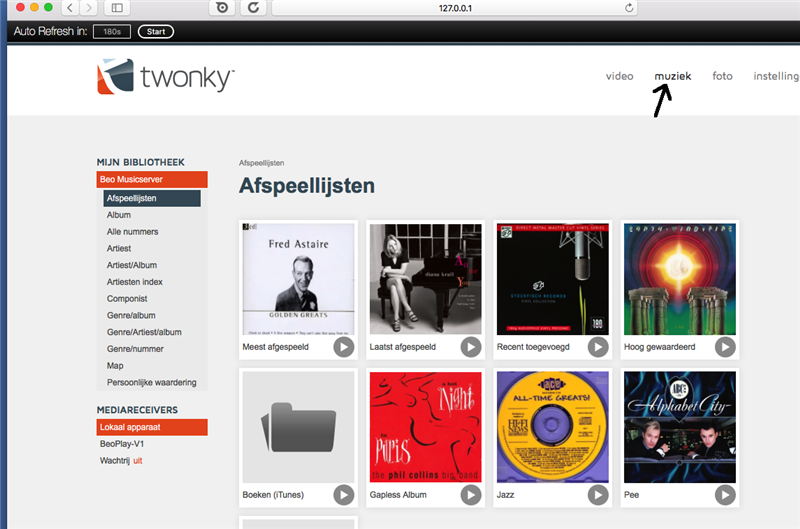
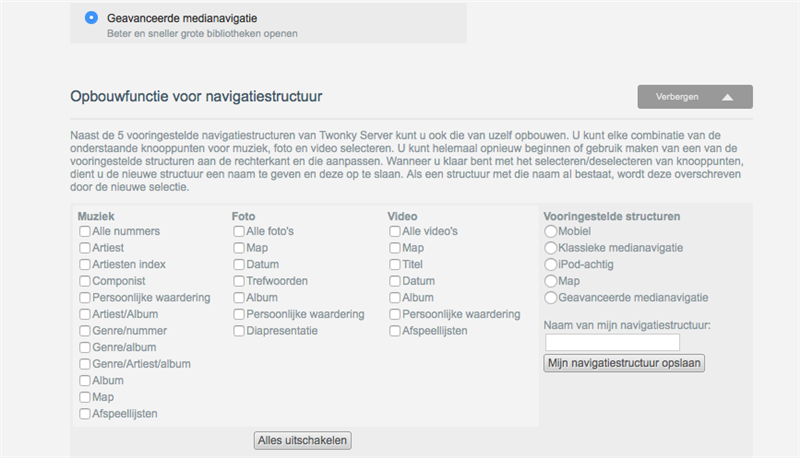
Under "setup" where must i mark!? Under "mobile" Classic Media navigation" "iPod like" "by folder" or "advanced Media navigation"...!!???
Do not alter this setting(s), leave it on advanced Advanced Media navigation.

Under "aggregation" Schall i marking "enable aggregation" or not!!???
and schall i marking "ignore" "aggregate" "autocopy"
Again, do not alter the setting(s). This is only applicable is you have more servers in use…

i Think i Will do a complete factory reset on the moment when you have answered :-)
Likely this will be the best, you could otherwise already messed up everything on the Moment. But don’t add your Deezer credentials, skip this part on the Moment and add only your Twonky server name to the DLNA settings. Now you will have a better view if all your music is added to the Moment. You can add your Deezer credentials anytime later in the menu.
My answer is under moderation 🙁
Please Log In to Reply
You must be logged in as a BeoWorld member to post replies to forum threads.
or

Join BeoWorld
Register to access the forums, reference material, and exclusive member benefits — including our monthly prize draw.
Become a Member