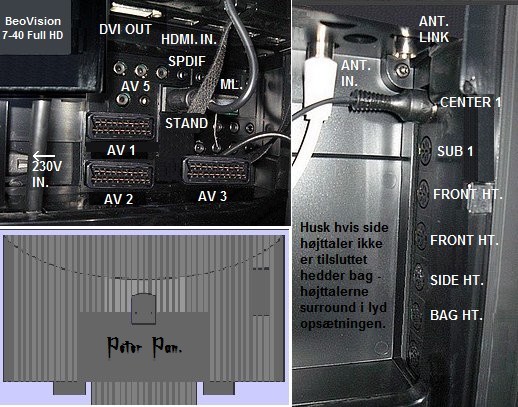
Hi Beoworld Members,
I’m new to the forum and can’t find the details to set up my new Beolab 4000 as my rear speakers on my BV7? I have check the details in the BV7 user manual, but this just references another guide which I can’t find.
I’ve connected socket 1 of the left beolab 4000 speaker cable to powerlink socket 1 (sub) on the BV 7 and daisy chained (socket 2) the other speaker cable to right speaker (socket 1)
i’ve configured the beolab 4000s under the speaker types menu, and when I scroll down in the menu the beolab 4000 led changes to green and I can hear the white noise test signal in each speaker as I scroll
I think issue might be due to the sound system setting currently showing output format: stereo Speaker 1.
i believe I need to change a menu to set up speaker 2 and 3 to complete the connection or is there something else I’ve missed?
can anyone help and show where I’m going wrong?
Many Thanks and looking forward to your support.