Advise on NL/ML network needed

29 replies

I'm swapping my BV10-40 for a BV11-46 and thereby need to join my exiting ML network with NL.

I have discussed with my dealer but I would like the Forums advise as well.

This is my planned setup:
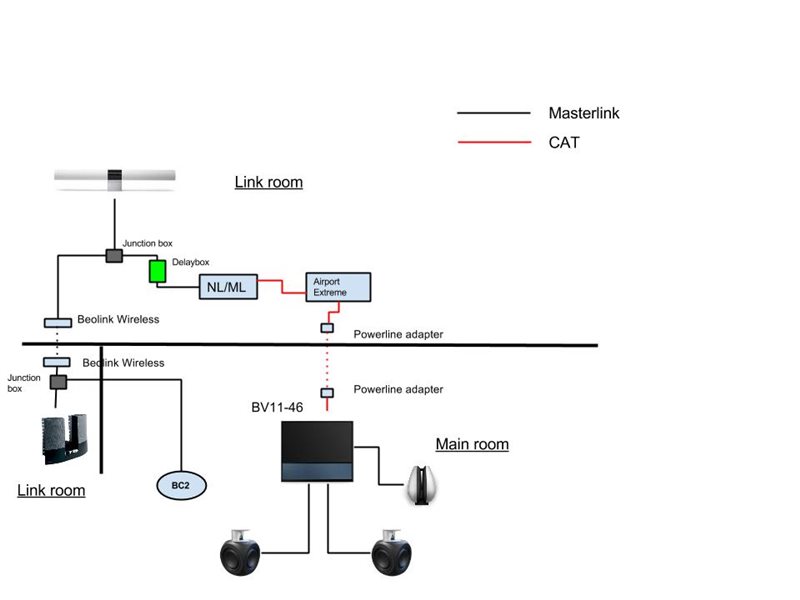
New stuff I plan to add, apart from the BV11:

- Beolink Wireless. That bit is cabled today but it does not look so good.

- NL/ML converter. Obviously needed and part of the deal I´ve done for the BV11.

- Delay box. I will play music on the BL2000 and the BC2 simultaneous, and the delay box will fix that as I understand it.


Some questions:


  1. Is it okay to build a network after a Beolink Wireless, or are they intended to use just to connect directly to e.g. a BL3500?
  2. Can the delay box be "tuned" or is it a fixed delay?
  3. Is someone using powerline adaptors between the BV11 and a router when using NL/ML converter. Does it work well?  


Any experience out there that I need to know, or general advise would be awesome.


Location: Sweden

My B&O Icons:
Beovision-11.png Beovision-11.png
Beosound-Emerge.png Beosound-Emerge.png
Beoremote-One.png Beoremote-One.png
Beoplay-M5.png Beoplay-M5.png
Beoplay-M3.png Beoplay-M3.png
Beoplay-Earset.png Beoplay-Earset.png
Beoplay-Beosound1.png Beoplay-Beosound1.png
Beoplay-A1.png Beoplay-A1.png

Hi Hiort,

1: as far as I know it is only for a direct connection - and would be too unreliable anyway.

Keep your cables!

2: the relay-box can (and must) be finetuned!

3: no personal experiences, but B&O recommends PowerLine - and even sell the Develo dLAN products in the shops.

MM

Location: Flensborg————Danmark

This drawing is not right. In this setup, the sound from your BC2 played through the BV11 will get delayed twice. (Convertor and Delay-box)

Masterlink from your BC2 should go straight to your NL/ML-convertor. From there expand your ML-network, but start with the delay-box.

DoubleU wrote:

This drawing is not right. In this setup, the sound from your BC2 played through the BV11 will get delayed twice. (Convertor and Delay-box)

Masterlink from your BC2 should go straight to your NL/ML-convertor. From there expand your ML-network, but start with the delay-box.

Thanks.

When you say "go straight to your NL/ML convertor", what do you actually mean? There is only one ML socket on the NL/ML convertor, right? 

Location: Sweden

My B&O Icons:

Beovision-11.png Beovision-11.png
Beosound-Emerge.png Beosound-Emerge.png
Beoremote-One.png Beoremote-One.png
Beoplay-M5.png Beoplay-M5.png
Beoplay-M3.png Beoplay-M3.png
Beoplay-Earset.png Beoplay-Earset.png
Beoplay-Beosound1.png Beoplay-Beosound1.png
Beoplay-A1.png Beoplay-A1.png

Your right! There should be a junction box between BC2 and convertor. From junction box go to the delaybox


Hiort wrote:

DoubleU wrote:

This drawing is not right. In this setup, the sound from your BC2 played through the BV11 will get delayed twice. (Convertor and Delay-box)

Masterlink from your BC2 should go straight to your NL/ML-convertor. From there expand your ML-network, but start with the delay-box.

Thanks.

When you say "go straight to your NL/ML convertor", what do you actually mean? There is only one ML socket on the NL/ML convertor, right? 

I just checked the manual and there is one Mastelink socket and one RJ45 on the "Masterlink side" of the converter. Should I connect the BC2 to eg RJ45 and from Masterlink socket go to delaybox and then to rest of the Masterlink network?

Location: Sweden

My B&O Icons:

Beovision-11.png Beovision-11.png
Beosound-Emerge.png Beosound-Emerge.png
Beoremote-One.png Beoremote-One.png
Beoplay-M5.png Beoplay-M5.png
Beoplay-M3.png Beoplay-M3.png
Beoplay-Earset.png Beoplay-Earset.png
Beoplay-Beosound1.png Beoplay-Beosound1.png
Beoplay-A1.png Beoplay-A1.png

That might work, as the ML and RJ45 on the "Masterlink side" are equal. Not sure though!

What I meant was like in my modified drawing. I only forgot to draw a junction box..

DoubleU wrote:

That might work, as the ML and RJ45 on the "Masterlink side" are equal. Not sure though!

What I meant was like in my modified drawing. I only forgot to draw a junction box..

I see what you mean now.

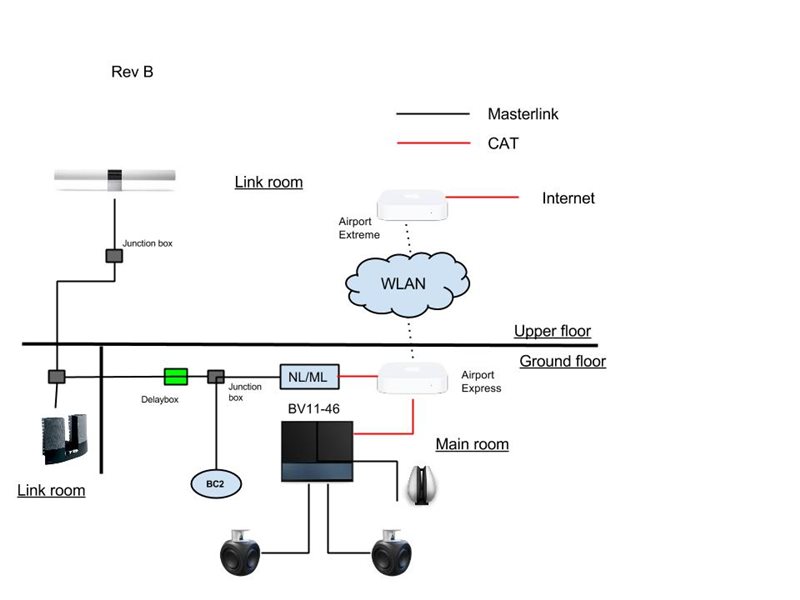
Have done some additional thinking, and have the below amended drawing. I intended to use my Airport Express to get a simpler setup. It is possible to add that to my existing WLAN and use both ports.

Will it be okay for the NL/ML and the TV to be connected that way?


Location: Sweden

My B&O Icons:

Beovision-11.png Beovision-11.png
Beosound-Emerge.png Beosound-Emerge.png
Beoremote-One.png Beoremote-One.png
Beoplay-M5.png Beoplay-M5.png
Beoplay-M3.png Beoplay-M3.png
Beoplay-Earset.png Beoplay-Earset.png
Beoplay-Beosound1.png Beoplay-Beosound1.png
Beoplay-A1.png Beoplay-A1.png

Not sure with the AE, but this drawing looks better!!

Why don't you replace the AE for a 2nd router and create a dedicated network link router. It's also the way B&O wants you to do this. This way your sound system is cabled and stable. 

And I would replace WLAN for a powerline adapter..

DoubleU wrote:

Not sure with the AE, but this drawing looks better!!

Why don't you replace the AE for a 2nd router and create a dedicated network link router. It's also the way B&O wants you to do this. This way your sound system is cabled and stable. 

And I would replace WLAN for a powerline adapter..

Regarding the AE I´ve tested this morning that its possible to use both ethernet sockets when I use the AE to connect to the existing network over WIFI.

If I would use a connection to the main router over powerline I have only one ethernet connection left on the AE. Not sure its okay to connect both NL/ML and BV11 to a switch.

Could you please explain more in detail how a dedicated network link router would differ from what I have in my drawing?


Location: Sweden

My B&O Icons:

Beovision-11.png Beovision-11.png
Beosound-Emerge.png Beosound-Emerge.png
Beoremote-One.png Beoremote-One.png
Beoplay-M5.png Beoplay-M5.png
Beoplay-M3.png Beoplay-M3.png
Beoplay-Earset.png Beoplay-Earset.png
Beoplay-Beosound1.png Beoplay-Beosound1.png
Beoplay-A1.png Beoplay-A1.png
or
BeoWorld Gold Membership card
Join BeoWorld

Register to access the forums, reference material, and exclusive member benefits — including our monthly prize draw.

Become a Member

December 2026 Prize Draw

Gold Members Only

As a Gold member you're automatically entered into our exclusive prize draw — your chance to win iconic Bang & Olufsen products. A unique benefit of BeoWorld Gold membership, every draw brings a new opportunity to win something special.