Beolab 3500. I have a Beosound 3200 & a Beolab 3500 (later version with a masterlink & powerlink socket). & would like to use the soundbar wirelessly. Would this device do the job? B&O BeoLink Wireless1 if not what would I need?
Thank you to our Sponsors
Beolab 3500. How do I connect wirelessly. B&O BeoLink Wireless 1 ?
10 replies
I believe you need to connect a BeoLink Wireless 1 set to TX via a MasterLink cable to your BS3200, and a BLW1 set to RX via ML cable to your BL3500. In my experience, the BLW1 is finicky, and you want to make sure both TX and RX have the same software version - hopefully the latest.
Stan
Hallo max65special
If you have the right version of BeoLab 3500 can it also stand alone.
So you can stream to it with a Chromecast audio, and a iPhone / iPad.
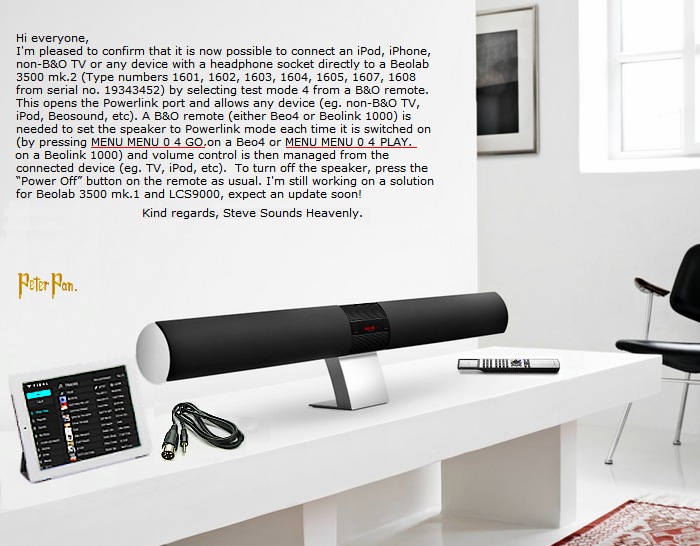

/ Peter Pan
Hi Peter Pan,
Thanks for this. We can now get all versions of Beolab 3500 working as a stand alone speaker with a portable music player via a simple cable connection:-
Location: The cable workshop, England
My B&O Icons:
Cables, friendly advice and great ideas for connecting Bang & Olufsen! Ask any questions at https://soundsheavenly.com to get the best from your B&O! Please visit my B&O YouTube channel at https://www.youtube.com/soundsheavenlycables
Doesn't the last software version of the Beolab 3500 switch off the ML connector in favour of supporting the wireless capability? I suggest you clarify what software versions your cable works with so no-one is disappointed.
Hi Frog,
All versions of Beolab 3500 can be manually switched to the 8 pin DIN input (MCL on early versions, Powerlink on later versions). My cables use this configuration to allow a local music source to be added directly to the speaker via the DIN socket, with volume control from the music source. I have tested this with all versions of Beolab 3500.
Kind regards, Steve.
Location: The cable workshop, England
My B&O Icons:
Cables, friendly advice and great ideas for connecting Bang & Olufsen! Ask any questions at https://soundsheavenly.com to get the best from your B&O! Please visit my B&O YouTube channel at https://www.youtube.com/soundsheavenlycables
Dear All,
Old topic but I'm going to buy a second hand Beolab 3500 to connect it to my actual sound system with masterlink wireless (Beolink Wireless 1). Therefore I asked the seller for the serial number of his BL3500s (he sells two of them).
On the first one, there is no S/N but the software is 1.2 => I conclude that it will not be compatible
The seconde one, type is 1601, serial number is 17601170, year 1993 and software revision is 2.0. Question: is it compatible with Wireless 1?
Regarding Peter Pan's post above, I fear not but perhaps I'm lucky...
Last point, price is 300€. I do not know his condition yet. It seems to be on the top of the rate.
Many thanks for your answers.
Take care.
Christophe
Hi Christophe
All versions of Beolab 3500 should work with Beolink Wireless 1 when connected with a Masterlink cable.
In order to use the speaker via a Powerlink cable, it must be a mk2 version (DIN socket marked as Powerlink) AND software level at 3.1 or above.
Hope this helps.
Kind regards Steve.
Location: The cable workshop, England
My B&O Icons:
Cables, friendly advice and great ideas for connecting Bang & Olufsen! Ask any questions at https://soundsheavenly.com to get the best from your B&O! Please visit my B&O YouTube channel at https://www.youtube.com/soundsheavenlycables
Hi Christophe
All versions of Beolab 3500 should work with Beolink Wireless 1 when connected with a Masterlink cable.
In order to use the speaker via a Powerlink cable, it must be a mk2 version (DIN socket marked as Powerlink) AND software level at 3.1 or above.
Hope this helps.
Kind regards Steve.
Hi Steve,
Thank you for your quick reply and explanations.
It's now clear for me.
Regards,
Christophe
Hi Steve,
” BeoLink Wireless 1 can be used with any pair of active loudspeakers except BeoLab 3500. BeoLab 3500 will later be updated to include a PowerLink socket to enable it to be compatible with BeoLink Wireless 1. It will not be possible to upgrade any existing BeoLab 3500 loudspeakers to include this new connection.”
so this is not correct, it should work?
Please Log In to Reply
You must be logged in as a BeoWorld member to post replies to forum threads.
or

Join BeoWorld
Register to access the forums, reference material, and exclusive member benefits — including our monthly prize draw.
Become a Member